
Instruments that deal in amount only
This is used for instruments like PSP’s (Personal Share Portfolios) and instruments where there are additional costs at the fund manager that is not included in the price of the fund e.g commission and administration fees. These cost are thus factored into the market value of the fund and the fund manager deducts units or cash from the fund. If you don’t want to mirror these unit deductions or additions you can set the fund to deal in AMOUNT only.
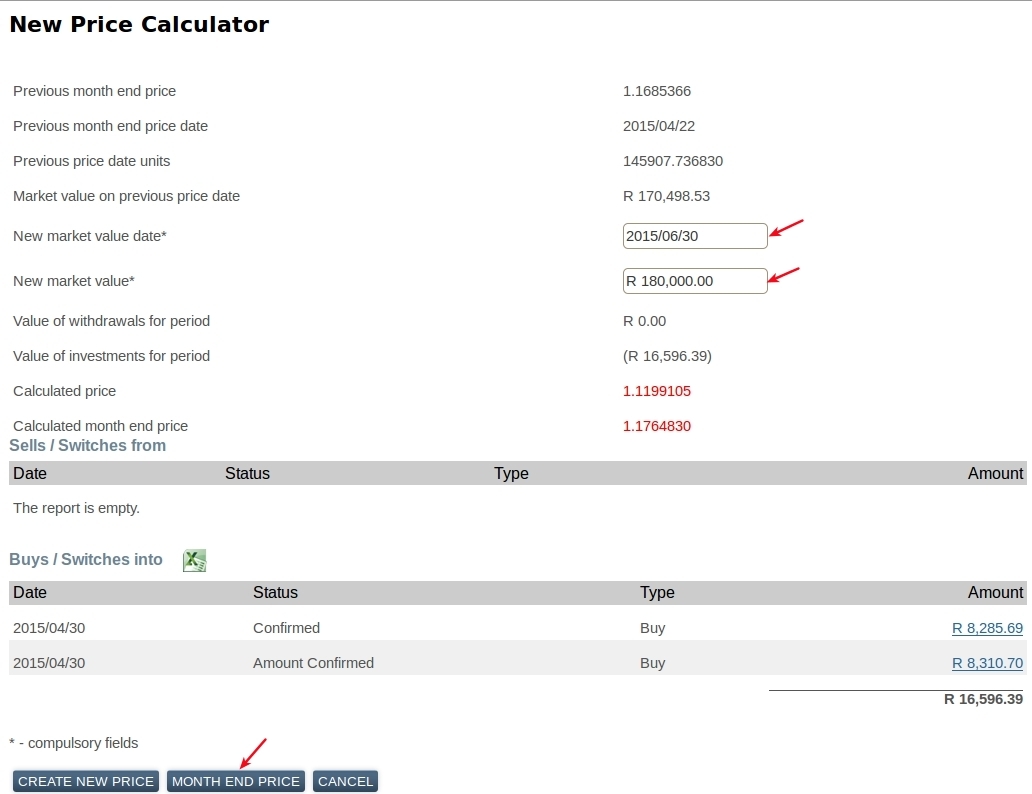
(New Market Value – Investments + Withdrawals) / Old Market Value * Old Price
[star_list]
- New Market Value Date: The transaction date on the fund manager statement of the units you are about to confirm
- New Market Value: The market value AFTER the transaction you are about to confirm
- Investments: All confirmed and unconfirmed INVESTMENTS between previous month end and New Market Value date
- Withdrawals: All confirmed and unconfirmed WITHDRAWALS between previous month end and New Market Value date
- Old Market Value: Previous month end market value. This will be the units on the system * the last price on the instrument in the previous month
- Old Price: Last price on the instrument in the previous month
Also do not create any New Prices if you have not create a month end base price. If the unconfirmed bulk instruction is for the previous month do a New Price first and confirm the instruction, then do a month end. If the unconfirmed instruction is for the current month, do a Month End price first, then Create New Price, then confirm the instruction.
MENU STEPS FOR THE NEW PRICE CALCULATOR:
Select the Instrument for which a month-end price should be created -> Prices button -> New Price button
Enter the “New market value date” and the “New market value” amount.
Click the “Month End Price” button.
Last Updated on 5 years ago by Antoinette Van Meyeren