
Automated Matching of Deposits
There are two triggers for the system to automatically match a deposit to an entry in an imported bank statement:
- When a bank statement is imported.
- When an investment instruction is submitted. (if the below configuration is switched on)
Automated matching will only occur if the Contract Number or ID/Company Registration Number or Surname is used in the bank reference and the Amount is the same.
To activate the second trigger for automated matching, Go to (1) System (2) Configuration:

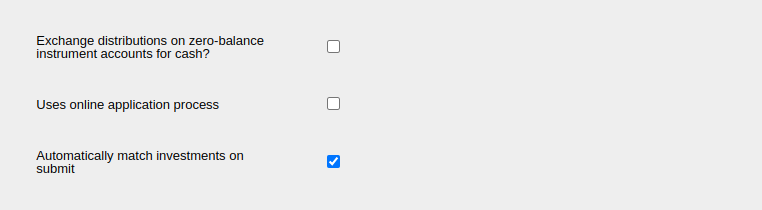
Under the Defaults section, select Automatically match investments on submit:
Status and results of matching:
The matching process continues in the background once the bank statement has imported, review the import results including warnings once this has completed. To confirm whether the matching process has completed, click into ‘view import results’ from the Import Statement screen and observe the ‘Status’ field which will indicate processing or done. Alternatively, view the status of the background process via System -> Background Processes -> processes which are not completed will not indicate a timestamp in the ‘END TIME’ column on screen.
Manually re-trigger automatic matching:
If an instruction was not in the correct status at the time of importing the bank statement, the deposit will not be matched automatically however the automatic matching functionality can be manually triggered via these steps:
- Navigate to the supplier instrument account associated with the bank account (Banking -> import bank statements -> click into supplier instrument account)
- Supplier instrument account card -> menu: Automatically Match
Last Updated on 2 weeks ago by Hayley Jerram