
Cancel a completed Once off/Cash Transfer In/Recurring Investment/Lump Sum investment if invested in the contract’s cash inflow account
A matched and completed instruction may be cancelled if the funds are in the contract’s cash inflow account and only where a switch/money transfer has not taken place. The user requires the “Cancel investments and investment initial fees” Global Permission in order to do this.
When the instruction is cancelled, the matched bank entry will automatically be unmatched and all the linked transactions cancelled. The linked transactions could include initial fees or in the case of a Retirement Product the transfer to the retirement component account.
The fee transaction will create a negative entry on the relevant Fee Control Accounts for the Administrator/Advisor etc. And the retirement component transfer will also be cancelled if applicable.
The cancelled instruction will no longer appear in the contract’s cash inflow account and the contract statement will not reflect any of these cancelled transactions.
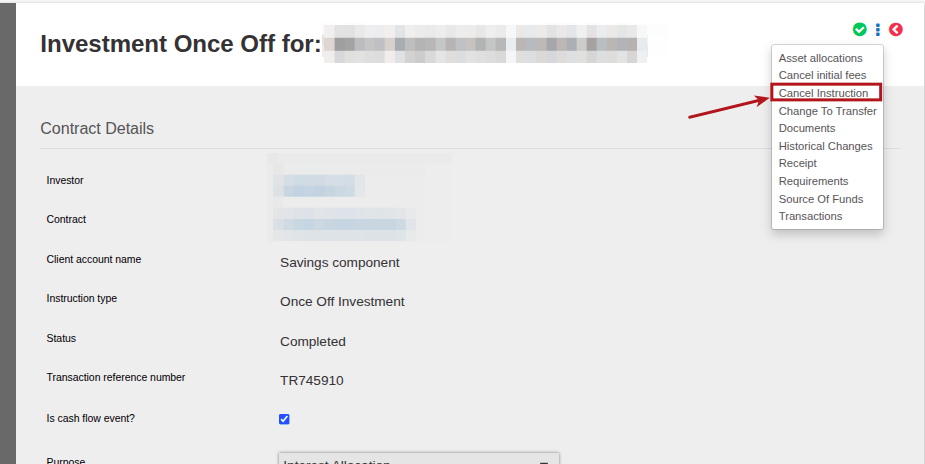
To cancel the instruction, navigate to the required instruction, select more details and then Cancel Instruction
You can review all the transactions have been cancelled by navigating to the instruction, select more details and then Transactions:
Example: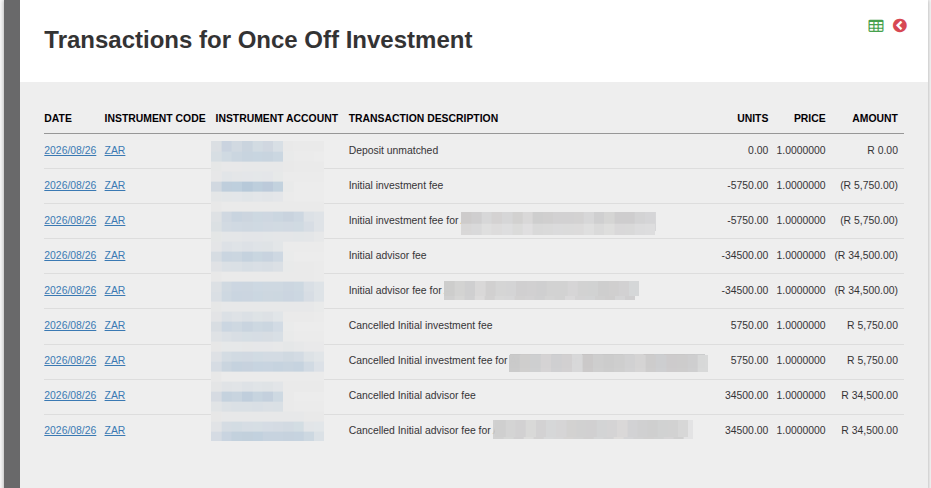
Last Updated on 4 weeks ago by Adrienne Dill