
Cash Instrument Distribution/Interest
Select the Cash instrument and select the relevant Interest rate to be applied from the drop-down list. Also see Create and Update interest rate set

Follow the process as in Distributions for other Instruments to add a Distribution.
Complete the Declaration – and Reinvestment date
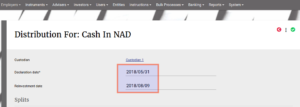
The system will calculate the Outstanding interest based on the interest rate selected on the Instrument and individual client balances on each day.
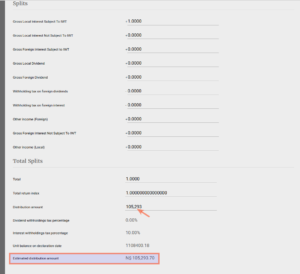
The ACTUAL interest received is typed into the “Distribution amount” field. The system will allocate the “Estimated distribution amount” to the investor accounts and there may be a recon difference between the interest received and the interest allocated.
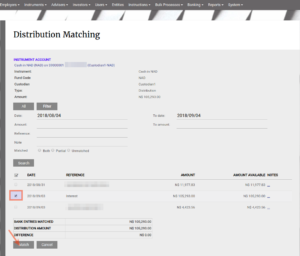
Match the interest amount received
Note: There is a system setting to ensure the distribution is matched before allocating. To activate this functionality go to System>- Configuration>- Select “Should match distributions before allocating?”

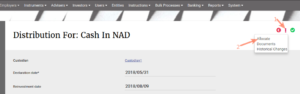
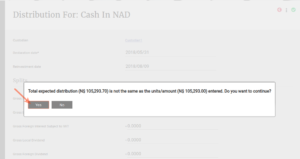
Where there is a difference between the “Distribution amount” and the “Estimated distribution amount”, the system will bring up a warning message on allocation. if the distribution amount was entered correctly, select ‘Yes” and the interest will be allocated.
The working portfolio is used to “fund” this difference. Interest to the clients are added to the client portfolios and deducted form the working portfolio. Giving a 0 effect. The actual interest received from the fund manager is added to the working portfolio. The net effect is that the total fund value (sum of all the underlying portfolios including working portfolio) only increases by the amount the fund manager added as interest.
E.g
Interest received: R10.25
Interest investor transactions (Estimated distribution amount): R12.00
Recon difference: R1.75
Accounts impact
Client A: + R5
Client B: + R7
Working portfolio: -R7, -R5, + R10.25 (net R1.75)

The workflow list of Interest and Distributions can be seen under Bulk Processes -> Distributions
Select the relevant dates, and if already allocated and Confirmed by Revenue Services

Last Updated on 3 months ago by Debra Hart