
Confirming Dealer Instructions Using ‘Exchange Shortfall of Units for Cash’
Background
Once created from the ‘instructions ready to send to dealer’, a dealer instruction will reflect on the ‘Dealer Instructions’ screen and the status will indicate ‘processing’. Each dealer instruction may be viewed by clicking into the amount in order to view the ‘Dealer Instruction Details’ screen. When attempting to confirm the instruction, where underlying contracts have a shortfall in the units required, a warning is displayed and the instruction cannot be confirmed.
Instrument Instructions on a Dealer Instruction
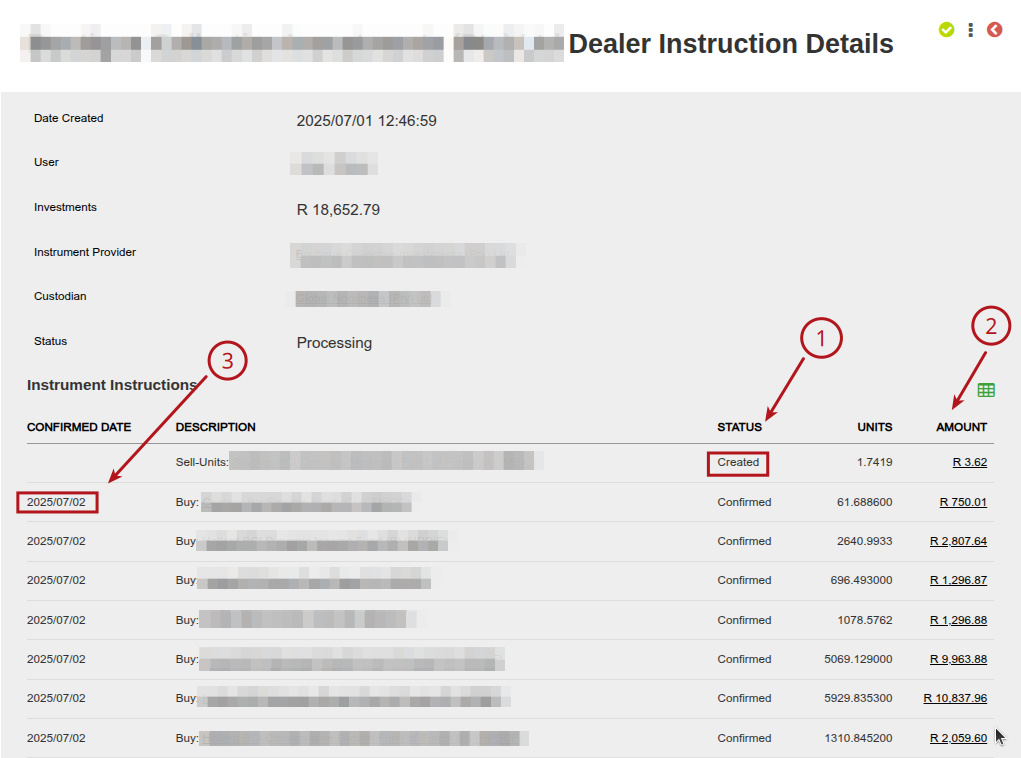
Multiple instrument instructions may reflect on a single dealer instruction, each underlying instruction will indicate an individual processing status (1) of ‘created’ or ‘confirmed’. The individual underlying instructions may be viewed by clicking on the amount (2) and once confirmed, will be updated to indicate a ‘confirmed’ status and reflect the date of confirmation in the ‘confirmed date’ column (3).
Contract Note for Sell or Buy:
Clicking on the amount linked to an underlying dealer instruction in ‘created’ status on the ‘Dealer Instruction Details’ screen will direct the user to the ‘Contract note for Buy’ or ‘Contract note for Sell’. Following the same steps on an underlying dealer instruction in ‘confirmed’ status will direct the user to the ‘Confirmed Buy’ or ‘Confirmed Sell’ screen’.
Option to Exchange Shortfall of Units for Cash on ‘Contract Note for Buy’ or ‘Contract Note for Sell’ screen
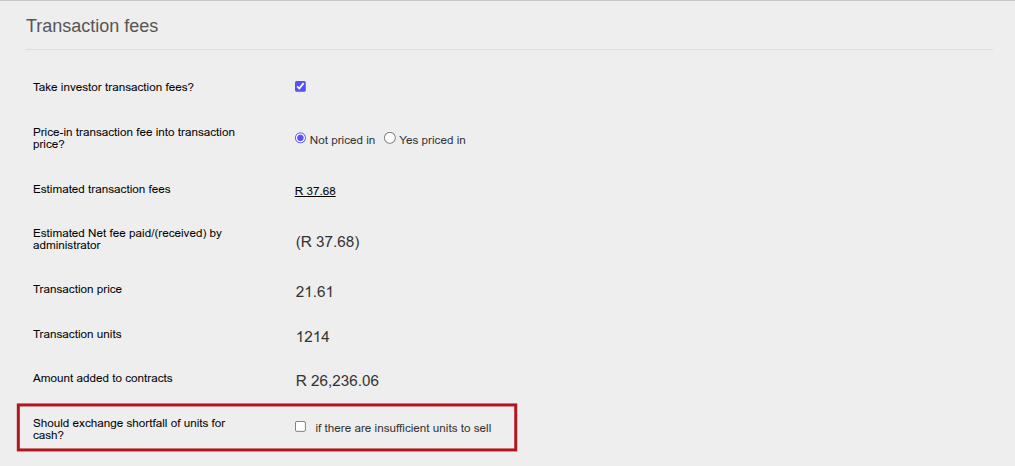
Using the ‘Should exchange shortfall of units for cash?’, the system will adjust the number of units required from the working portfolio to each instrument account with a shortfall in units, and exchange a cash amount from the contracts’ settlement cash accounts to the working portfolio as payment for the units. If the ‘Should exchange shortfall of units for cash? checkbox is selected, this process will occur automatically upon selecting the ‘confirm’ button on the dealer instruction.
This function may assist in instances where instructions such as a model switches have been initiated ahead of other occurrences on contracts that impacts the available units, such as a debit order reversals. The units may be partially or entirely not available for the switch linked to the dealer instruction to continue, this is indicated by the warning message indicating a shortfall in units and prevents the dealer instruction from being confirmed.
If the checkbox is not selected, a warning will be displayed when attempting to confirm the dealer instruction to indicate a shortfall of units on specific contracts. The warning will not reference all contracts with shortfalls, it will indicate the first three instances in the instruction.
Last Updated on 1 year ago by Hayley Jerram