
06 Mar How do I test emails/sms from the Test site?
To prevent emails/sms being sent to actual email addresses or phone numbers of investors, advisors or employers from the Test site, a security measure was implemented that by default, NO emails/sms will be sent to the actual recipients from the Test site. There is an override that you can populate, so that all emails from the test environment are sent to this email/list of email addresses.
On Production you can maintain this override email list called Override ALL test emails to. This field is maintained by the clients themselves and when a restore is done from production to test, then the test environment will have this override as it was updated on production. Note that you can also change it on test if you’d like for a specific test case, but this will not be saved or remembered following a deployment/restore. The test environment will always revert back to what is populated on production following each deployment/restore.
On the Test environment you can maintain the Override ALL sms to field, this is not maintainable on production.
1. Select System -> Configuration
2. Complete the “Override ALL test emails to” field and/or the “Override ALL sms to” field with the relevant email address or phone number and save.
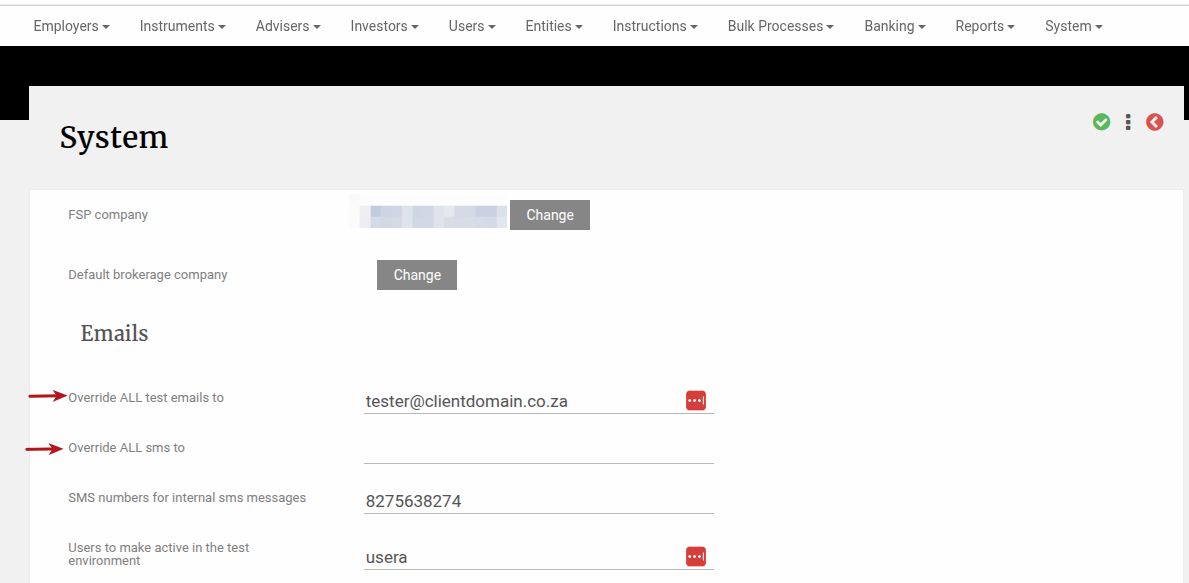
Once the email/sms override is activated, all the system emails/sms will be directed to the specified email address/phone number. The actual email address/phone number that it would have been sent to, can be seen in the email log (System -> Emails) or the sms log (System -> SMS).