
Filters available when creating dealer instructions
Filters are available when creating dealer instructions to be able to select for which deals dealer instructions must be created.
Go to Bulk processes->Dealer instructions and select ‘Create Dealer Instructions’

A combination of the drop-down lists and radio buttons in the red square can be used to limit/select the instructions that will be displayed for inclusion in the instructions to be created, when the search button is clicked.
After search has been selected, the instructions to be included in dealer instructions that will be created can be further limited by using the header row filters:
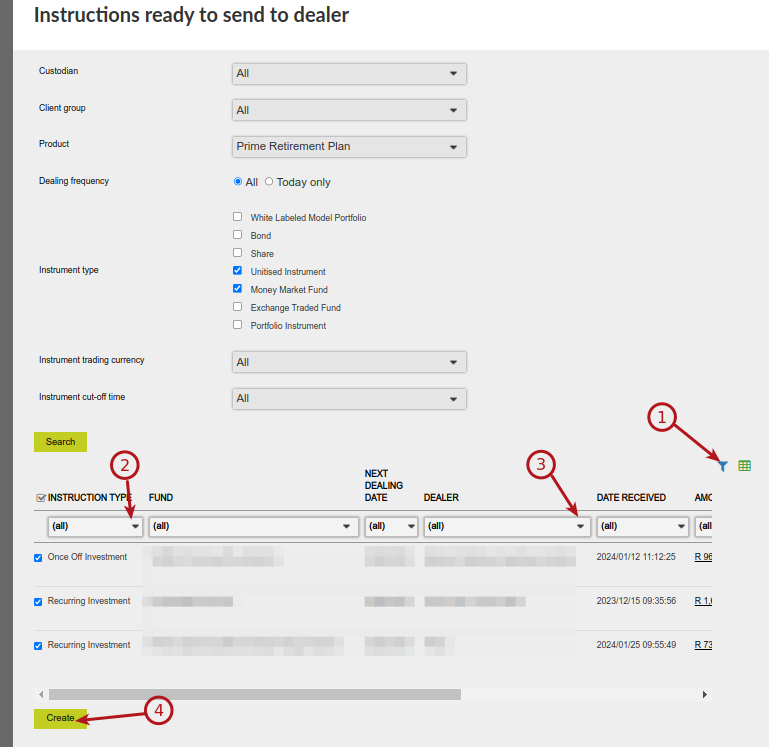
In the example above 2 and 3 can be used to select the instruction type and relevant dealer for which dealer instructions must be created, when 4 is selected.
Also see Instrument cut-off time
Last Updated on 3 years ago by Antoinette Van Meyeren