
Limit special character input
Certain special characters (symbols) can or cannot be typed into different types of fields in the system to minimise security risks.
These limitations does not apply to template inputs, note inputs such as ‘Notes on investment status’, ‘Notes on workflow tasks’, ‘User Messages’ or passwords.
In general, text fields should not allow any of: `~!^*=|}]{[;<>?
Exceptions:
- Person fields are the most restrictive (surname, first name, initials, address lines, Investment name etc), does not allow `~!^*=|}]{[;<>?(),:+&@#$%
Most permissive are company fields and Instrument fields where only the following characters are not allowed:
- Company fields `~^+=<>
- Instrument fields (and model portfolio) `~^=<>
- Email fields do not allow ‘[]()<>,;:#””’
- Email fields also check that the string respects a normal email format i.e. something.whoever@a.b.c
- In the email field a , is allowed as a special delimiter that we use to separate email addresses in the same email field i.e. a@b.com,c@d.com
Where needed special characters are allowed, for instance:
- Telephone Number will allow + ( )
- Amount fields will allow currency characters (), to name a few
In the fields where the limitation of special characters apply, there is also a size limit of 100 characters.
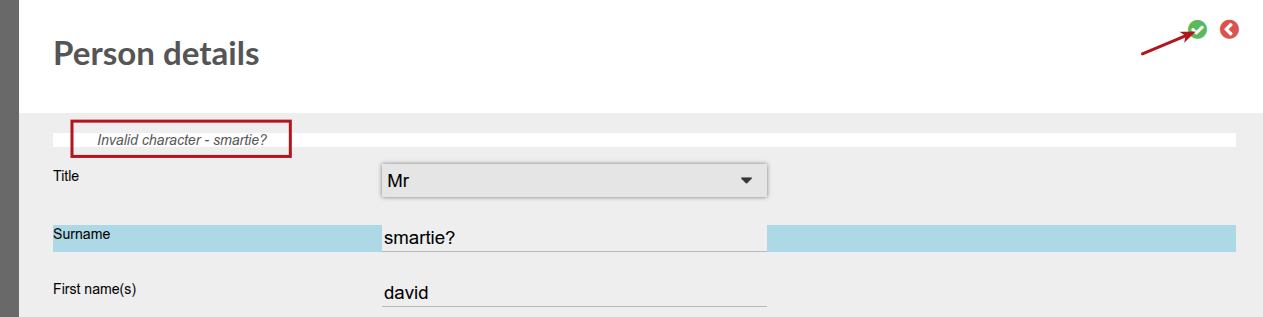
An error message will appear when selecting save on a page where an invalid character were inputted.
NOTE: These validations currently only apply to inputs via the user interface
Last Updated on 4 days ago by Antoinette Van Meyeren