
Override Minimum Recurring Investment Instruction Amount on Employer
Also see Minimum Investment Instruction Amount
The Minimum Recurring Investment Instruction Amount as set on a product can be overridden on an employer.
Go to the relevant employer (Employer Card->View Details) and select ‘Override minimum recurring investment’. The field ‘Minimum recurring investment instruction amount’ will appear. Update the minimum amount and save.
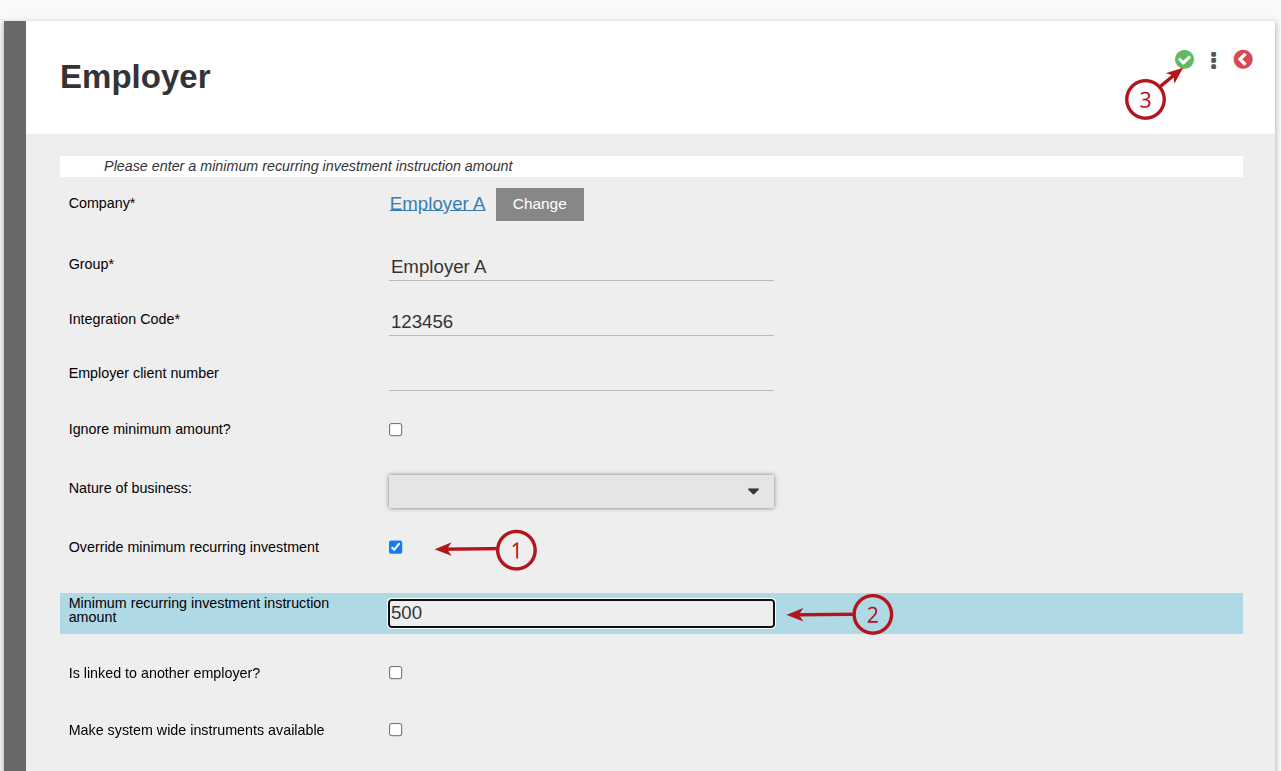
The ‘Minimum recurring investment instruction amount’ as set on the employer will be used for validation of minimums on recurring instructions on the employer, instead of the ‘Minimum recurring investment instruction amount’ as set on the product.
To revert back to the Minimum recurring investment instruction amount’ as set on the product, untick ‘Override minimum recurring investment’ on the employer.
TAKE NOTE:
The set minimum recurring Investment instruction amounts will not apply if:
The User/administrator has the permission ‘Ignore minimums on investments’
OR
the setting ‘Ignore minimum amount?’ has been ticked on the Employer
Last Updated on 1 year ago by Debra Hart