
Fees can be imported on an Instrument level (ETF, Unitised & Money Market) or fees that was updated on Instrument level can be removed with the import
Go to Exchange Traded Funds, Unitised Instruments or Money Market under the Instruments main menu:
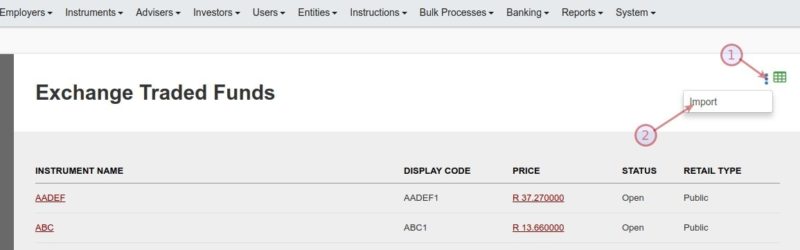
The import screen contain export functionality with which the current instrument setup can be exported
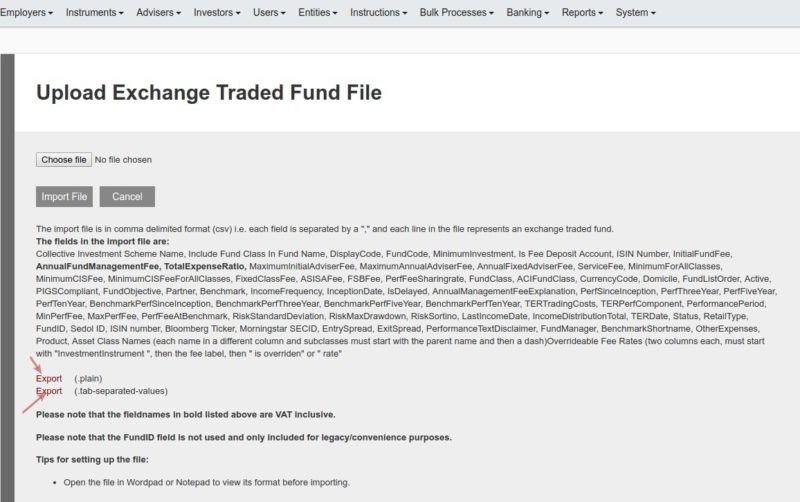
The last columns in the export file can be used to update the fee rates or remove fees that was overridden on the instrument level, with the 2 columns available per Fee Type. For instance ‘InvestmentInstrument Administration fee is overriden’ and ‘InvestmentInstrument Administration fee rate’
See the example file InstrumentFeeOverride
Fees for instrument AADEF1 (line 2) will revert back to the fee rate as set on the product, as the column ‘InvestmentInstrument … fee is overriden’ is set to ‘No’
Fees for instrument ABC1 (line 3) will be updated to 6% , as the column ‘InvestmentInstrument … fee is overriden’ is set to ‘Yes’ and ‘InvestmentInstrument … fee rate’ is set to 6
Last Updated on 7 years ago by Antoinette Van Meyeren