
Split payment and transfer batches for linked/not linked bank accounts
- Payment file formats and transfer file formats are available on both payment and money transfer batches.
- For transfers, because we have scenarios on Trading account transfers where the ‘transfer’ to a Trading bank account is actually a payment on the administrator’s online banking side, since we don’t manage the trading bank account and don’t have access to it. i.e it belongs to the dealer and is an external bank account.
- For payment, because we have scenarios where the ‘payment’ is actually a transfer on the online banking side, where the ‘to bank account’ is linked to the administrator’s banking profile.
- In both these scenarios we need the ability to create 2 batches instead of one when you create the batch and there are more than one entry in the batch. One batch for linked accounts and one for not linked accounts.
Note: payments will not become transfers on our system. It is just 2 payment batches so that you can use the correct online banking file format for the batch. Similar with transfers, the entries stay transfers.
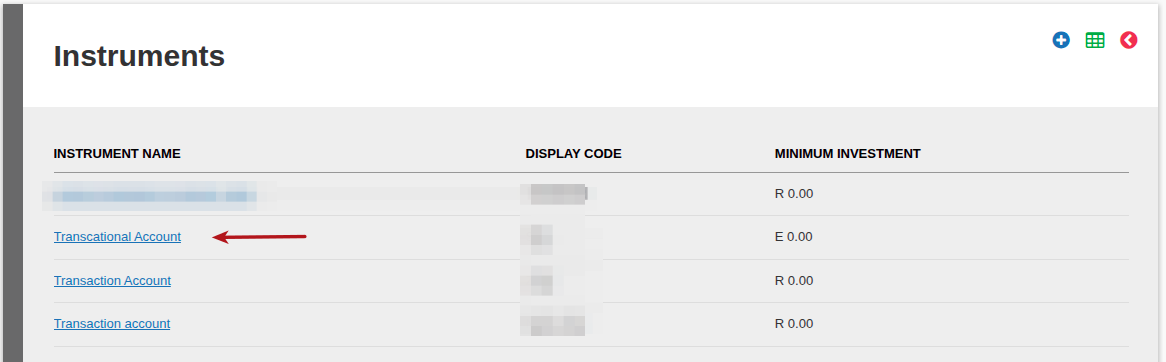
To activate the use of this functionality, go to the bank accounts on the Supplier instrument Accounts of all the cash instruments on the finworks system and indicate if the bank account is linked or not:
Instruments->Cash Instruments


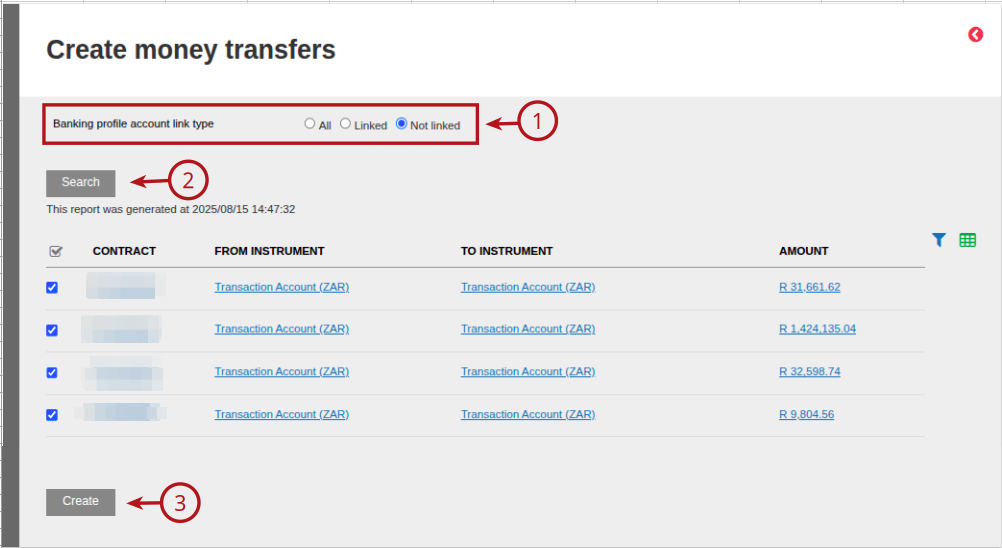
On the creation of Money transfers the option will be available to select ‘All, Linked or Not linked’ to be able to split money transfer batches before creation. This will simplify the selection in order to use the correct online banking file format for the batch.
On the creation of Payment files the option will be available to select ‘All, Linked or Not linked’ to be able to split Payment file batches before creation. This will simplify the selection in order to use the correct online banking file format for the batch.

Last Updated on 1 year ago by Debra Hart