
100% withdrawal/transfer out of a client account
Background
Ongoing fees are accrued and taken per client account. In other words each client account on a contract accrues it’s own fees for the holdings in the client account. When ongoing fees are taken during a fee run the fees as accrued on each client account are taken from the relevant client account and if there are not enough funds on a specific client account to take the accrued fees, fees will not be taken from this client account. Ongoing fees as accrued on other client accounts where enough funds are available will however still be taken.
If ongoing fees are not taken with a fee run on the relevant contract prior to doing a 100% withdrawal, a 100% client account transfer out or a 100% Internal unit transfer out of the client account, accrued fees will remain on the client account. Since there will not be funds available on the client account to take the accrued fees, the accrued fees will remain on the client account until funds are available again on the client account to take ongoing fees from.
A. Automatic System Actions
To prevent the remainder of accrued fees not taken, on a client account where 100% is withdrawn from a client account, withdrawal fees and ongoing fees are taken when the sells on the withdrawal complete, before confirming tax or waiting for payment (if no tax).
This action also ensures that the net amount remains fixed on a 100% withdrawal where a tax directive is required and the amount of the withdrawal needs to remain the same as the amount for which the tax directive has been applied for.
When new investments are made into the client account fees will resume to accrue again on the client account and holdings will be available to take the accrued fees from during a fee run.
Similarly, when doing a Client Account Transfer or Internal Unit Transfer instruction, the system determines if it is a 100% transfer and then takes the accrued fees from the client account before doing the transfer. The final amount transferred will then be the holdings minus the accrued fees.
NOTE: A popup message will be displayed when a 100% withdrawal is submitted and there are buy instructions in progress (auto recur, submitted, buying, authorised and a re-balance switch on a model client account).

Selecting ‘Yes’ will result in the last accrued fees not being taken due to the buy instructions which are still in progress.
Selecting ‘No’ will enable you to complete (or cancel) existing buy instructions before submitting the 100% withdrawal again where you want the final accrued fees to be taken.
B. User flexibility to override the Automatic System Actions
B 1. There may be instances where the administrator wants to taken accrued fees on a withdrawal despite the fact that the withdrawal is not a 100% withdrawal or where a buy instruction is underway.
In such instances the default as set by the system can be overridden on the withdrawal instruction by selecting ‘Take accrued fees with withdrawal?:
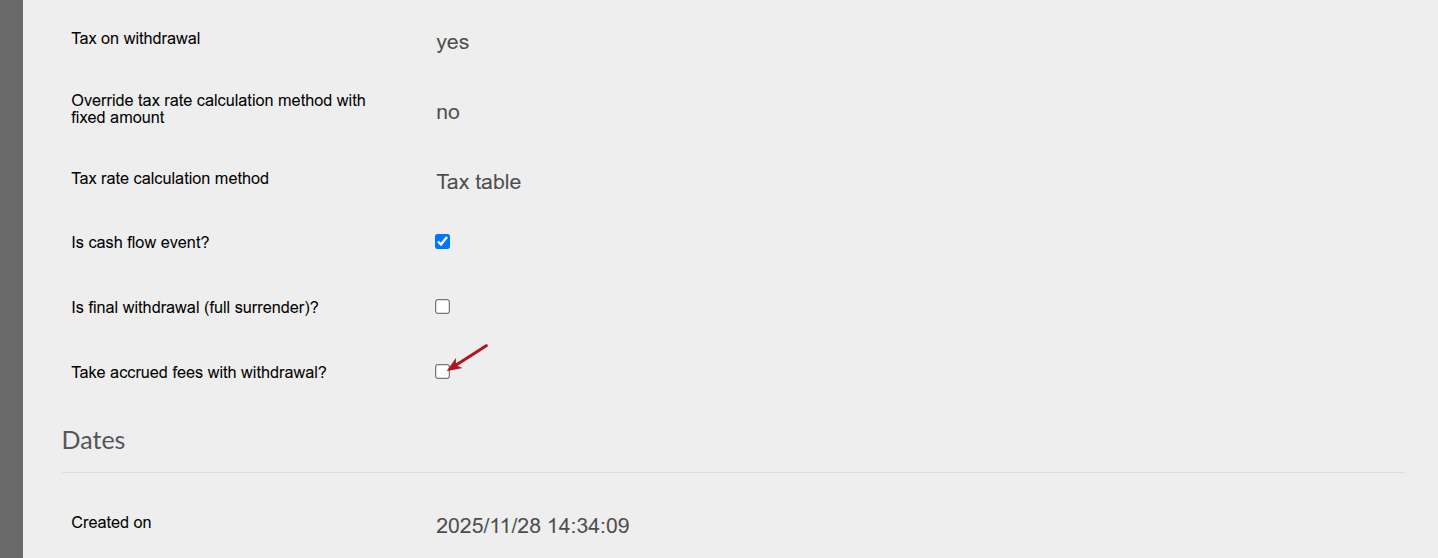
B 2. Similarly an administrator might not want to take accrued fees on a 100% withdrawal in some instances.
In such instances the default as set by the system can be overridden on the withdrawal instruction by unselecting ‘Take accrued fees with withdrawal?:
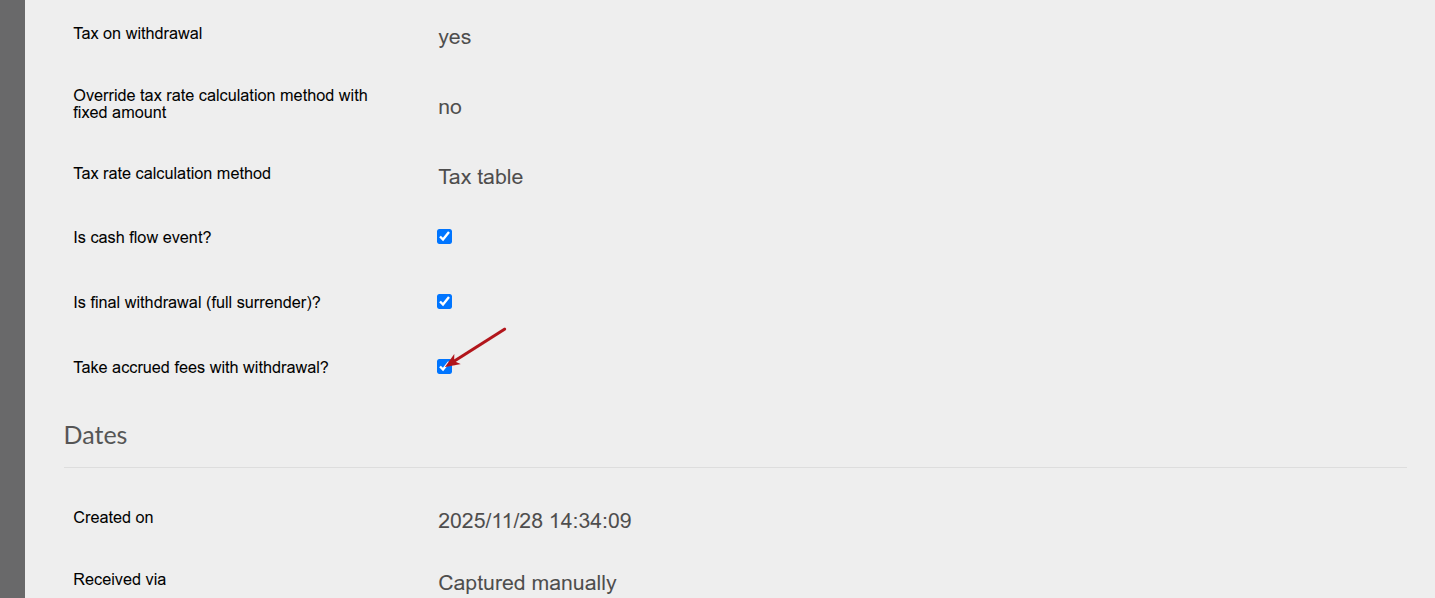
IMPORTANT: The override needs to be done prior to confirming the last sell on the withdrawal to take effect.
Where a contract is invested in a product that makes use of the Pot component system a 100% withdrawal from the savings component will not be regarded as a 100% withdrawal by the system and the administrator will have to follow the process as in B 1. to take the last accrued fees with the 100% withdrawal on the savings component, if needed.
C. Negative holdings on a client account
In an instance where a 100% withdrawal is created on a contract with negative holdings in an instrument, the system will not see it as a 100% withdrawal and ‘Take accrued fees with withdrawal?’ will not be selected automatically.
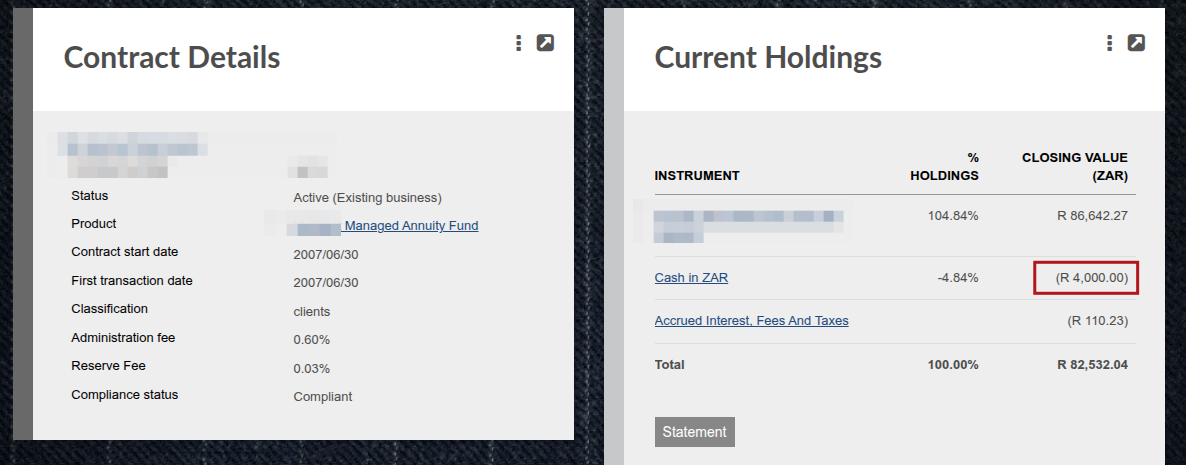
The administrator will also not be able to select ‘Take accrued fees with withdrawal?’ and a screen message will be displayed: Cannot take accrued fees with negative holdings in instrument: xxx
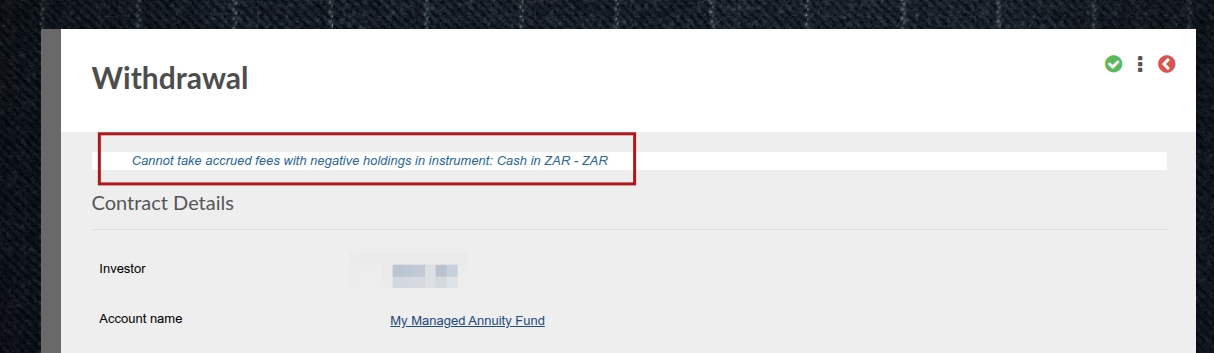
The administrator will have to resolve the negative holding first before being allowed to select ”Take accrued fees with withdrawal?’
Last Updated on 11 months ago by Antoinette Van Meyeren