
Automatically Activating users on Test
By default, when a restore of the database is done from Production to Test, all users are automatically deactivated. This is to ensure that only authorised people access the test environment, which is specifically meant for a client’s internal testing and projects.
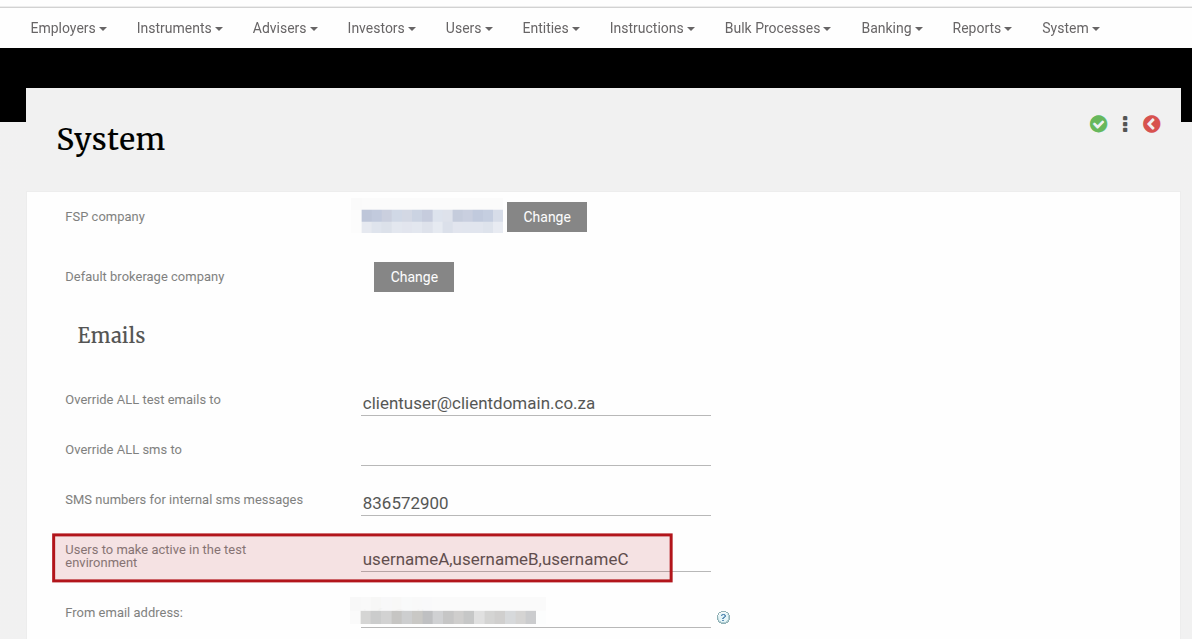
To make this activation easier, you can manage the list of users yourself on your production Finworks site, by navigating to System -> Configuration -> “Users to make active in the test environment” -> and providing a comma separated list of usernames.
Following this update on Production, when you do a subsequent restore of production to test, this list of users will automatically be made active in the test environment.
You can also manage the list of email addresses that will receive any emails sent from the test environment, please see this help file for more detail on managing this from your production site.
Last Updated on 6 months ago by Adrienne Dill