
Combined Statements
Combined Statements are relevant in the following scenarios:
- An investor has more than one contract
- A contract is owned by more than one owner
In both these scenarios a combined statement is helpful since you can see all contracts in one statement. For example if you are a contract owner of your own contract, and you are a contract owner with someone else on another contract, then in your combined statement you will see both your contract details of the contract you own by yourself, and the contract details of the contract you own with the other contract owner. The other contract owner however will not see the contract details of the contract you own by yourself.
In scenario 1 mentioned above, if all these contracts are linked to the same advisor, and the advisor is setup to receive communications, then the advisor will receive a statement containing all contracts in one statement, similarly to what the investor received.
If any of the contracts are linked to a different broker, then combined statements will not be sent to the advisor, since he is not linked to all the contracts in the portfolio.
Combined statements can either be sent in an Automated Email Statements Job which can be setup in System -> Jobs, as per this help file. However when setting up the Job, you must click the “Combined Statements” checkbox. Which means you have a specific Automated Email Statements Job for combined statements only.
When sending a combined statement and there are multiple options set for Automatically Email Statement Period on the individual contracts, the system will use the Automatically Email Statement Period as set on the first active contract, if no active contracts, then the first contract of any status is used.

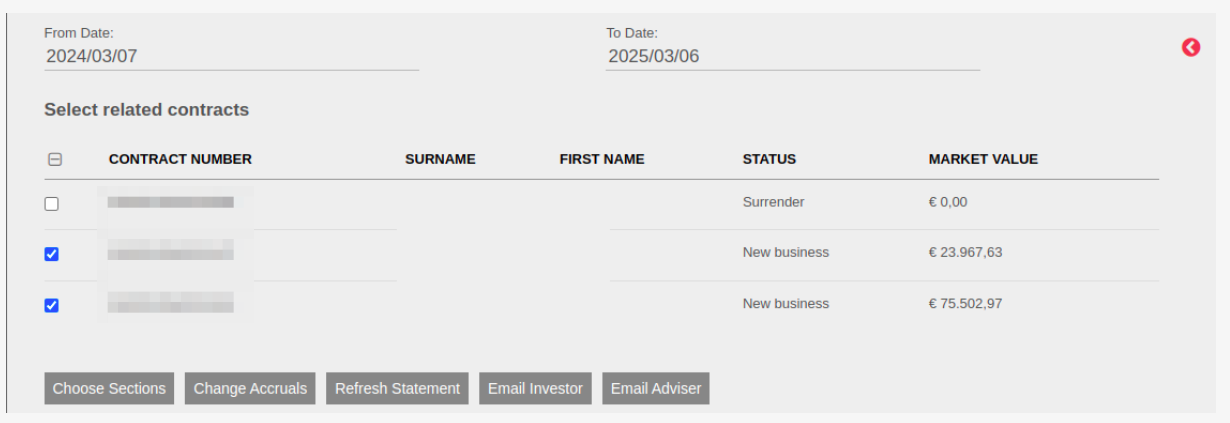
Or if you navigate to the Contract Owner card, on an investor who has multiple contracts, and you click on More Actions, you will see Combined Statement. You can email this combined statement to the investor or the advisor. You will only see the Email Advisor button if all contracts in this portfolio are linked to the same advisor. Similarly, if there are multiple contract owners on a contract, you will also see this option under more actions.
Last Updated on 1 year ago by Adrienne Dill