
Finswitch Realtime Prices Import Job – Schedule and Setup
Also see Finswitch Realtime Fund Price Imports
The ‘Finswitch Realtime Prices Import Job’ contains 2 sections with different functions:
- Setup
- Schedule
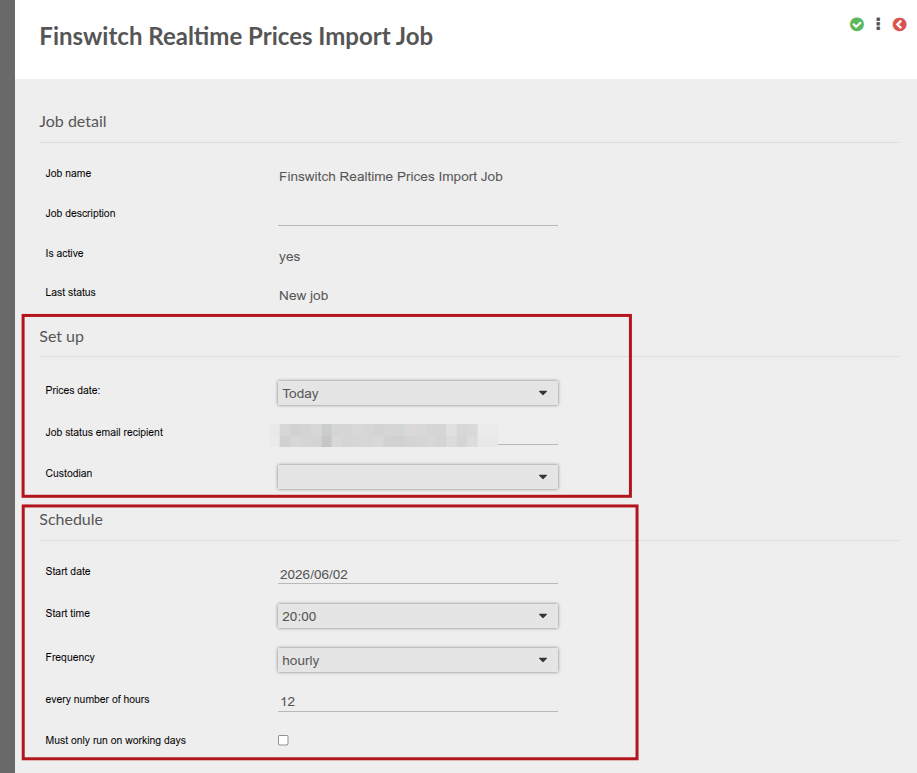
1. Setup
This is the set up of the job and does not affect when the job runs.
These are options we use to get prices from Finswitch. When the job runs, we use these to get prices on a certain date.
There are 4 options on the job:
- today
- yesterday
- previous working day
- previous working day or month end
They work as follows:
today
We get the prices on the same day that the job runs.
yesterday
We get prices on the previous day. If the job runs on 10/03/2026, we get the prices on 09/03/2026
previous working day
We get prices on the previous working day.
If the job runs on a Monday, we will process the prices for the Friday. If Friday is a public holiday, we will process the prices on the Thursday
previous working day or month end
We get prices on the previous working day. If the previous working day is in the previous month, we will process on month end.
Examples for previous working day or month end:
A. If current date is: 2025/10/01 and it is a Wednesday.
Then: previous working day will be 2025/09/30, the Tuesday,
and previous working day or month end will also be 2025/09/30, the Tuesday
B.. If current date is: 2025/09/01 and it is a Monday.
Then: previous working day will be 2025/08/29, the Friday,
but previous working day or month end will be 2025/08/31, the Sunday
The price for the Sunday will in this case also be updated
2. Schedule
The schedule determines WHEN the job runs.
IF the ‘Must only run on working days’ is checked, the job will not run over the weekend or on public holidays.
If it is not checked, it will run every day.
Last Updated on 4 months ago by Antoinette Van Meyeren