
Investor Statements
Statment can be created in one of the following processes:
More information on statement defaults please refer to Statement- and Combined Statement Defaults
Individual Account Statements
A statement for an investor account can be generated from the Current Holdings Card
Select (1)More Actions then (2)Statement

NOTE:
- The statement ‘To Date’ will default to today’s date and the ‘From Date’ to a year prior. The to and from dates can be changed. If the date period was edited, click on the “Refresh Statement” button, to update the statement.
- The opening balance on the ‘From Date’ will be the closing balance of the previous day. For instance, the ‘From Date’ is 1 June 2018, then the opening balance will be the closing balance as at 31 May 2018.
- If the first transaction date if after the selected “From Date” the first instruction date will be used as the “From Date”

Choose Sections
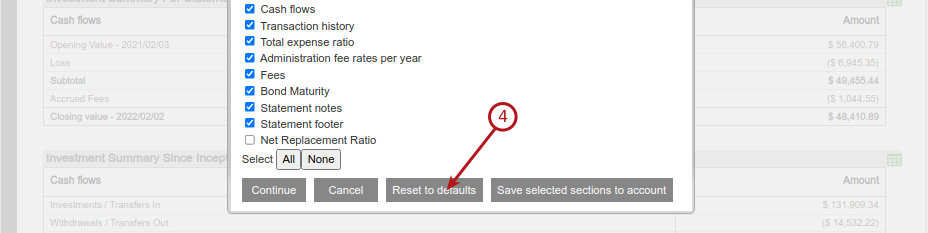
The sections displayed will default to those as setup under Statement defaults, but can be changed by selecting (1)Choose Sections.

NOTE:
- Make a selection, the default selection will be as per the System Default or as set on the Product
- If the default selection was changed the selection will not be saved on the account and only apply to the current session of generating a statement
- The option is available to either select (1)All or deselect all (1)None, the selection is not saved
- To save a statement section selection permanently to an account, use the (3)Save selected sections to account button
- The (4)Reset to defaults will reset the selection as per the System Default or as set on the Product, if (3)Save selected sections to account has been selected on the account


 A statement can also be produced in PDF format, by selecting the “Generate PDF Statement” link at the bottom of the statement.

Combined Statements
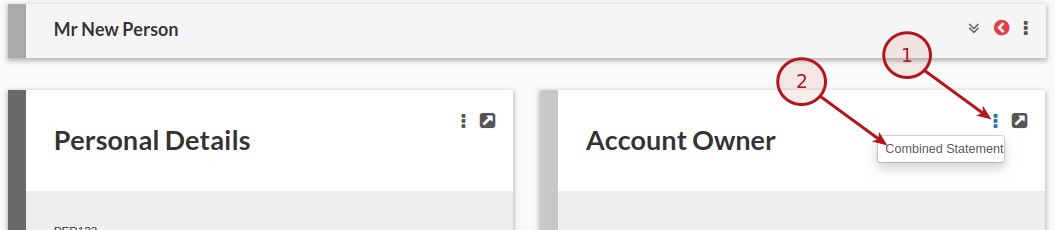
Combined statements, where an investor has more than one account, can be generated from the Account Owner Card
Select (1)More Actions then (2)Combined Statement
The accounts to be included in the statement can be selected, after which the “Refresh Statement” button must be clicked to update the statement. Further the same options, as available with statements generated from the Current holding Card, applies here.

Bulk Statements
Statements can also be generated in bulk per product.
Select the relevant product (System -> Product -> select product name) and go to “Investor Accounts”


Enter a date range

Select the sections to include in the statements

Select ‘Generate a (new) Bulk Statement file’.

The bulk statements will start generating in the background

A download link will appear as soon as the file is generated

The statements will be created as a zip file, with each individual statement PDF created with the Surname + Account number in the filename.
Last Updated on 4 years ago by Tinus Burger