
Source of funds
Source of funds is used on an instruction to identify the source of the funds for the investment.
- Source of funds can be enabled on product level
- Types of sources can be managed via the System main menu
- When adding an instruction select the source of funds
- Source of funds has been extended to identify SARS source codes (3601, 3603, 3610 & 3618), also refer to SARS PAYE Recon File
Enabeling Source of funds
Navigate to the product via the system menu; System -> Products and select the product on the list of product
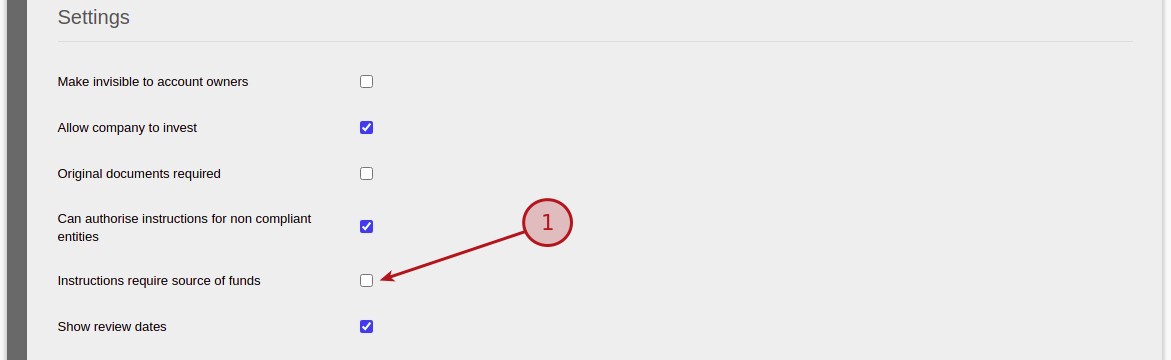
Scroll down to the Settings section and enable the Instructions require source of funds
Managing Source of funds
Navigate to the Investment Source of funds menu via the system menu; System -> Investment Source of funds
From this screen Source of funds can be (1)added, (2)edited or (3)removed

Attributes on Source of Funds
Attributes can be added to be associated with the Source of Fund; (1)add, (2)edited, (3)removed or move the Attribute up or down on the list (4)up down

Attributes can be either be set as a (1) Required Field or not and when capturing the information highlighted as below

Select Source of funds on an instruction
From the instruction More Actions select (1) Source of funds

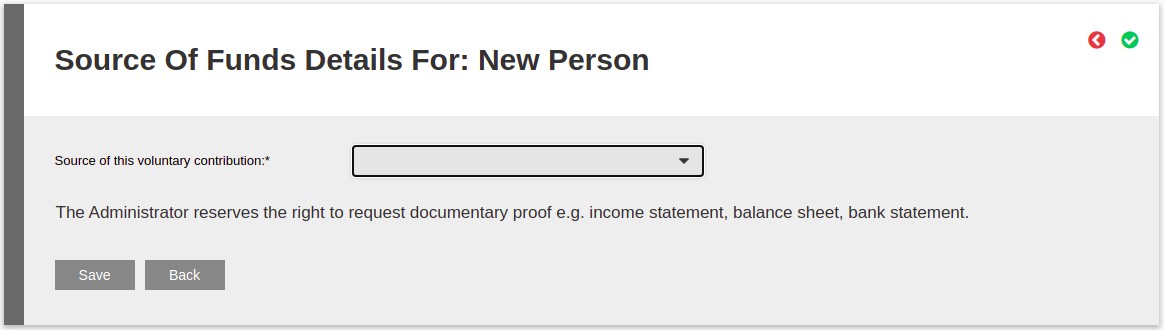
From the drop down list select the Source of funds for this instruction
For more information on instructions refer to Adding, Editing and Cancelling Instructions
Last Updated on 1 year ago by Antoinette Van Meyeren