
Additional Information – Person
NOTE: This items forms part of the Needs Analysis, refer to: Needs Analysis – Cash Flows
Additional details on a person can be captured under the (1)More Actions on the Personal card and selecting the (2)Additional Details button

Additional Information

The following fields are available:
- Marital status – Select from the drop-down list. The list can be updated under System -> Marital Status
- Preferred Currency – Select from the drop-down list. The Default system currency is used as a default.
Employment Details

The following fields are avaialble:
- Annual Salary
- Annual Pensionable Salary
- Annual Risk Salary
- Other income
- Increase of monthly cash flows (including annual salary increase)
Professional Details

The following fields are available:
- Occupation
- Highest qualification
- Company/ Employer Name
- Shareholding
Medical Details
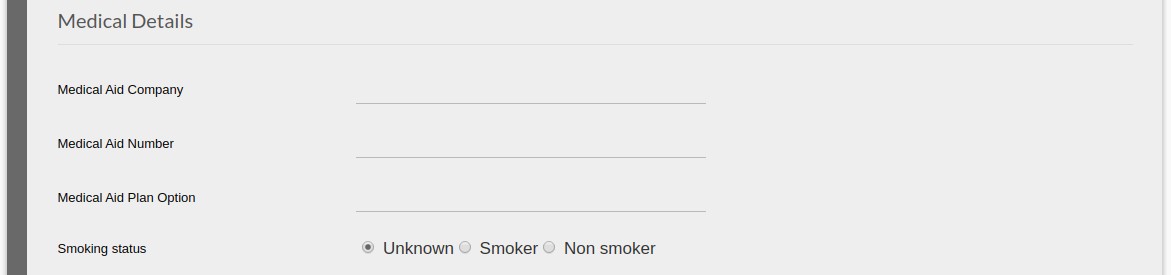
The following fields are available:
- Medical Aid Company
- Medical Aid Number
- Medical Aid Plan Option
- Smoking status
Needs Analysis Details
NOTE: The default can be set under Needs Analysis Defaults

The following fields are available:
- CPI Assumption
- Nominal Portfolio Growth
- Retirement: Use drawdown rate post retirement, Drawdown Rate Post Retirement, Retirement age & Life Expectancy
- Death: Use drawdown rate post death, Drawdown rate post death & Beneficiary Life Expectancy
- Disability: Use drawdown rate post disability, Drawdown rate post disability & Life expectancy after disability
- Severe Illness: Use drawdown rate post severe Illness, Drawdown rate post severe illness & Life expectancy after severe illness
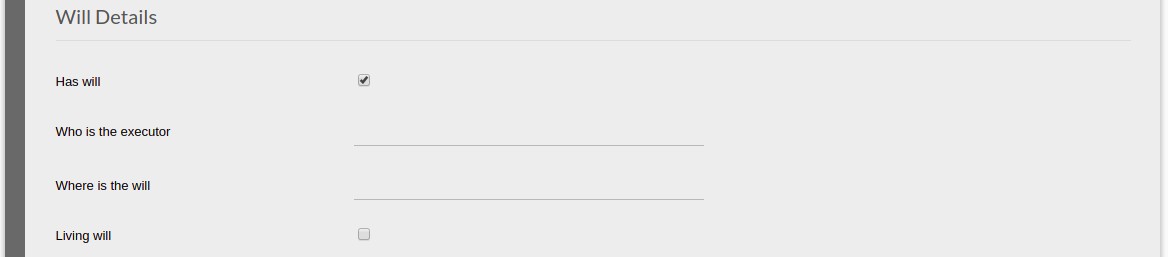
Will Details
NOTE: If the option “Has will” is not selected the other options are not shown, Image 1, if selected the other options will be visible Image 2

The following fields are available:
- Has will
- Who is the executor
- Where is the will
- Living will
Last Updated on 7 years ago by Tinus Burger