
Ad-hoc Fees
An ad-hoc fee is an once-off, unscheduled fee which is deducted from an Investor Contract as a withdrawal and paid to an Adviser/Brokerage/Distributor/Contract.
In order to process an ad-hoc Fee, the ad-hoc Fee Type needs to be be set up on the system, see link.
If a Fee split is required on an ad-hoc fee, this needs to be updated before processing the ad-hoc fee, see link
Once the Ad-hoc Fee Type is created, the ad-hoc fee also needs to added to the relevant Product, see link.
Methods for Ad-hoc fee collection
1. Ad-hoc fees can be imported via Bulk Processes -> Upload Ad-hoc Fees.
Note : When importing an ad-hoc fee file, the fees should be stated as positive values.
2. Ad-hoc fees can be taken from a contract.
Note : To process an ad-hoc fee on a contract, go to the investor contract required. On the Contract Detail card ->More Actions->Take Ad-hoc fees
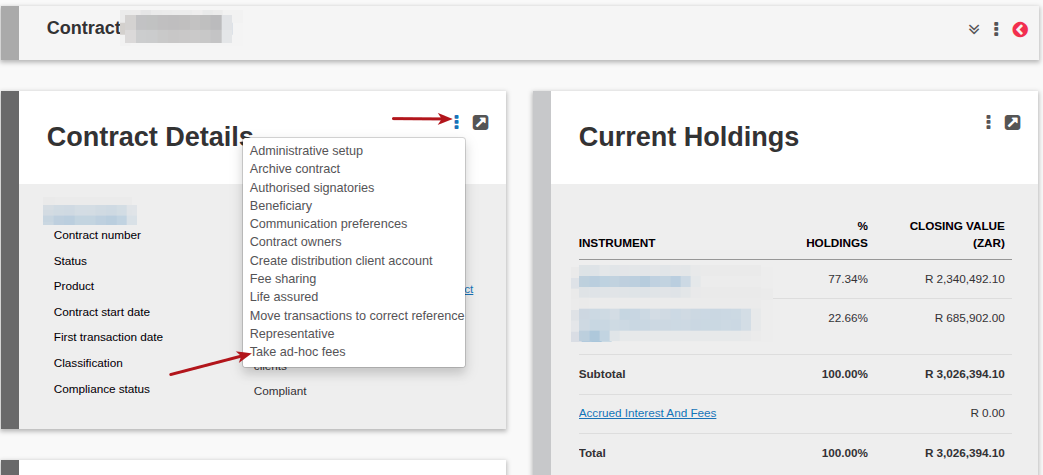
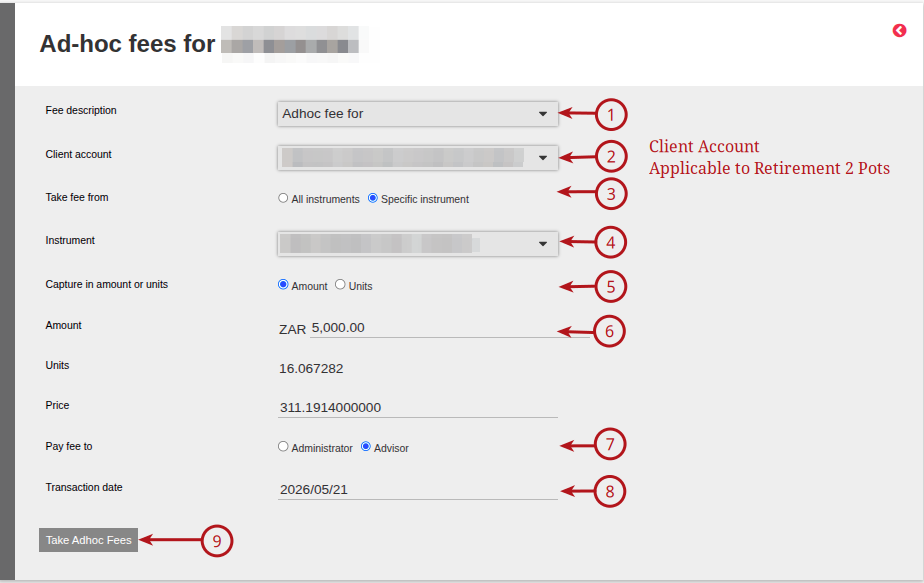
Complete the required information.
- Select the Fee description from the drop down menu
- Client account: This is applicable to the Retirement 2 Pot accounts, where you can select which “pot” the fee must be deducted from
- Take fee from: Select All (will deduct across all instruments with value) or Specific instrument
- Instrument: Used when “Take fee from” selection is applied, select the required instrument to deduct the fee from. This will populate the price and units of the selected instrument. Only instruments with available funds will appear on the drop down
- Capture in amounts or units:
- Amount: enter the adhoc fee amount/units required
- Pay fee to: Select Administrator or Advisor
- Transaction date: Select the required transaction date
- Take Adhoc fee
Last Updated on 1 month ago by Jamie Chinsamy