
Add Fee Types on a Product
Fee Type, Ongoing, Initial, Adhoc and Withdrawal Fees can be added to a Product
Fees setup on a Product level can then be overridden at an Instrument, Financial Advisor level and on a Contract level.
Fees can also be shared between Financial Advisors/Brokerages/Distributors/Contracts. See Link
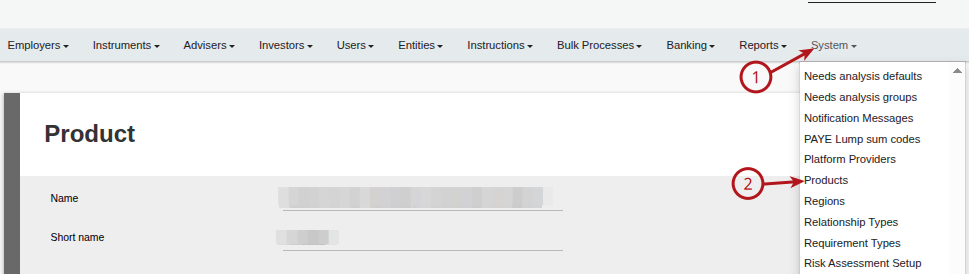
Select the required Product (1) System and then (2) Products
Select the required fee type:

Ongoing Fees
To add a new Ongoing Fee to the Product click on the (1)Add Button

Select the required (1) Fee Type from the drop down, (2) Fee Rate (amend this if required), (3) Minimum fee amount per account (excl VAT) if required, (4) Save

Important: When adding an Ongoing Fee on the Product, the system will use use the first transaction date set at a Contract level when doing the fee run. (The ongoing fee will generate from the first transaction date on the contract and not from when the Ongoing Fee was loaded on the Product)
Initial, Adhoc and Withdrawal Fees
- Select the required (1) Fee Type from the drop down
- Select the (2) Fee Portfolio where the fee is to be moved to. This provides the option that fees can be moved to one portfolio that is owned by an entity other than the entity for which the fee is intended for. The fee taken report will also show the entity for which the fee was intended.
- Select the (3) Recipient details. Normally the Recipient and the Fee portfolio owner will be the same entity but, there are cases where the recipient and the fee portfolio owner are not the same. For instance, where the Adviser is the recipient and the Brokerage is the Fee Portfolio owner. In this scenario, you need to load the bank details of the adviser on the brokerage entity as a third party bank account to make a withdrawal to the adviser for his fee share.

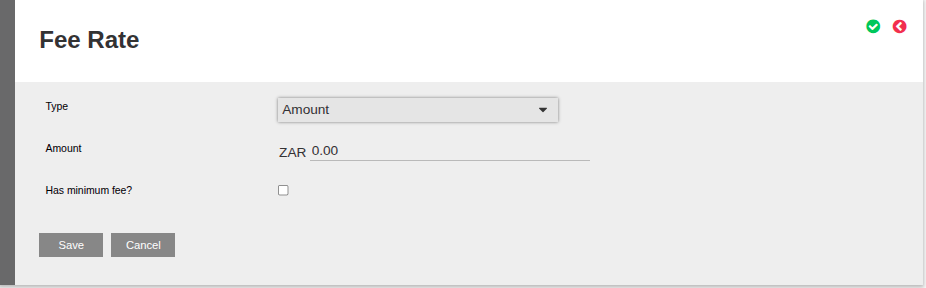
- (4) Fee Rate, Selecting “Change” next to the Fee Rate will provide the option to select the Type of Rate to apply:
- Percentage
- Amount
- Sliding Scale
Percentage Example

Amount Example
Sliding Scale Example

Last Updated on 3 months ago by Debra Hart