
Completed Investment Receipt
As part of the Completed Investment Receipt refer to the following:
- Setup Completed Investment Receipt Template (setup the document template)
- Setup Completed Investment Notification Message (setup the email template)
- Add Permissions
- Investor Setup
- Investment Receipt
Setup Completed Investment Receipt Template
- To setup the template refer to Setting up templates on a product
- Template name: Completed Investment Receipt Template
Setup Completed Investment Notification Message
- To setup the notification message refer to Editing notification messages
- Notification Messages name: Completed Investment For New Client
- The option is available for both Email -> Client and Email -> Adviser
- The [attachment:receipt] is listed on the “Available file attachments” that will be attached to the email
Add Permissions
- To be able to view the Investment Receipt the permission Receipt is required (Instructions -> Receipt)
- Refer to Setting Permissions on a user
- Refer to Global and Group Permissions
Investor Setup
- To enable email to be sent to an investor the following needs to be set: General communication preference and Send correspondence to
- Refer to Sending transaction notifications for more details
Investment Receipt
-
- On the completion of an investment the Receipt will be sent to the Client and or Adviser
- To view the Receipt navigate to the Active Instructions -> View Details

-
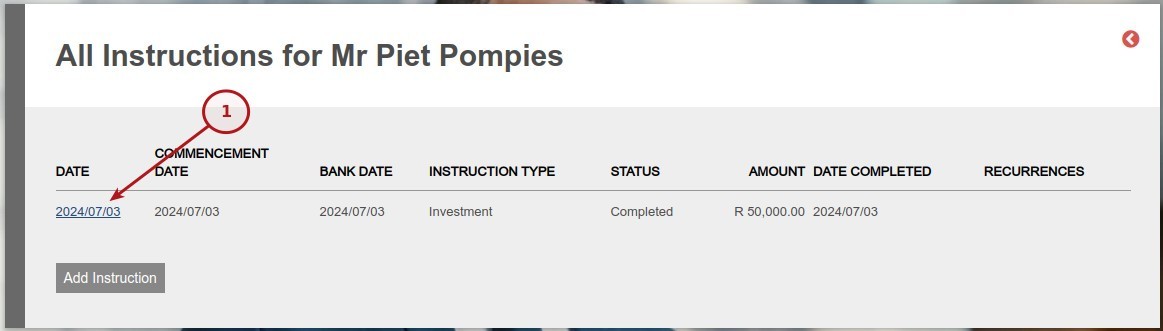
- Select the date of the specific Instructions from the list of All Instructions
-
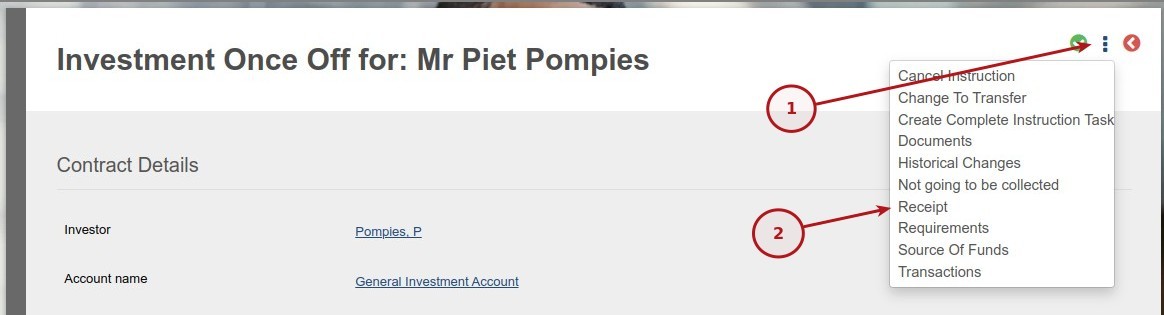
- From the More Actions select Receipt
Last Updated on 1 year ago by Tinus Burger