
12 May Release 12 May 2020 – Instrument Instructions
Posted at 09:23h
in Recent Updates
Instrument Instructions
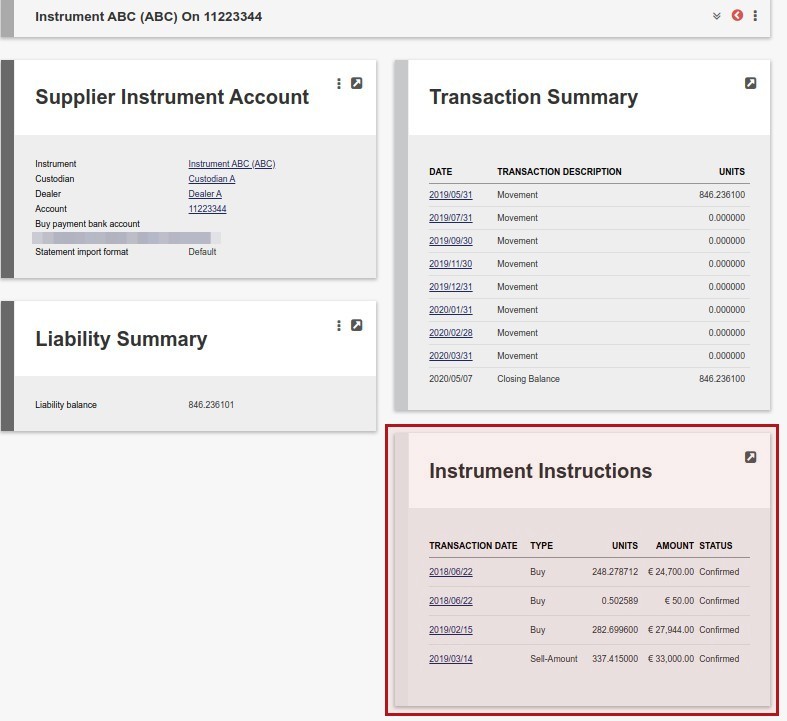
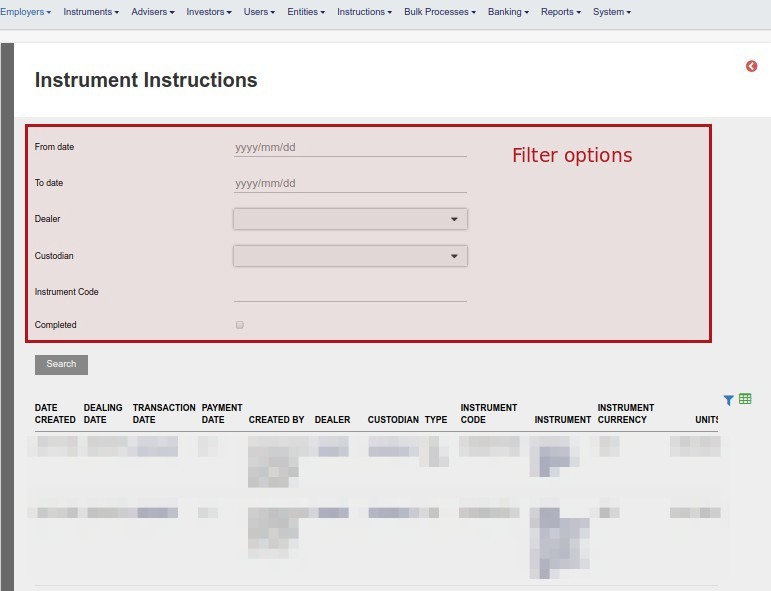
In this release, functionality has been added on two levels to improve navigation and search options pertaining to Instrument (dealer) Instructions by adding, A. Instrument Instructions Card to Supplier Instrument Accounts and B. Instrument Instructions to Dealer Instructions screen
A. Instrument Instruction Card on Supplier instrument accounts (see link to get to Supplier instrument accounts)
B. Bulk processes main menu -> Dealer Instructions -> More Actions -> Instrument instructions
More changes include:
- Add fields ‘Create date’, ‘Dealing date’ and notes section to Investment instruction screen
- Add filters to System->Emails screen to improve search and performance
- Create the ability to assign a workflow task to a dealer instrument instruction. See link
- Move currency to separate column in Transaction report download
- Improve description of Export transaction screen and ‘Date’ column heading in export file
- Update styling & text on instrument performance list document on a product
- Add tick-box option to insurance instruments to exclude them from the Performance Comparison Report
- Add ‘Fixed term Investment’ status to Instrument Statuses. See link
- Add date range to Brokerage card -> More Actions -> Ongoing fee report and move generation to back-end to improve performance
- Allow only users with Investor admin rights to untick ‘show only my tasks’ on Users->My tasks
- Add search filters to System -> Emails screen
- Expand the functionality of taking Bank charges on Money/forex transfers. See link and link
- Add additional columns to Reports -> Requirements report
- Improve consistency of permissions
Refer to your online Pivotal Tracker Project for a full list of changes and enhancements for the release.