
06 Jun Release June 2025 – Recurring withdrawals to only be captured in Amount
Recurring withdrawals to be processed in Amount value only
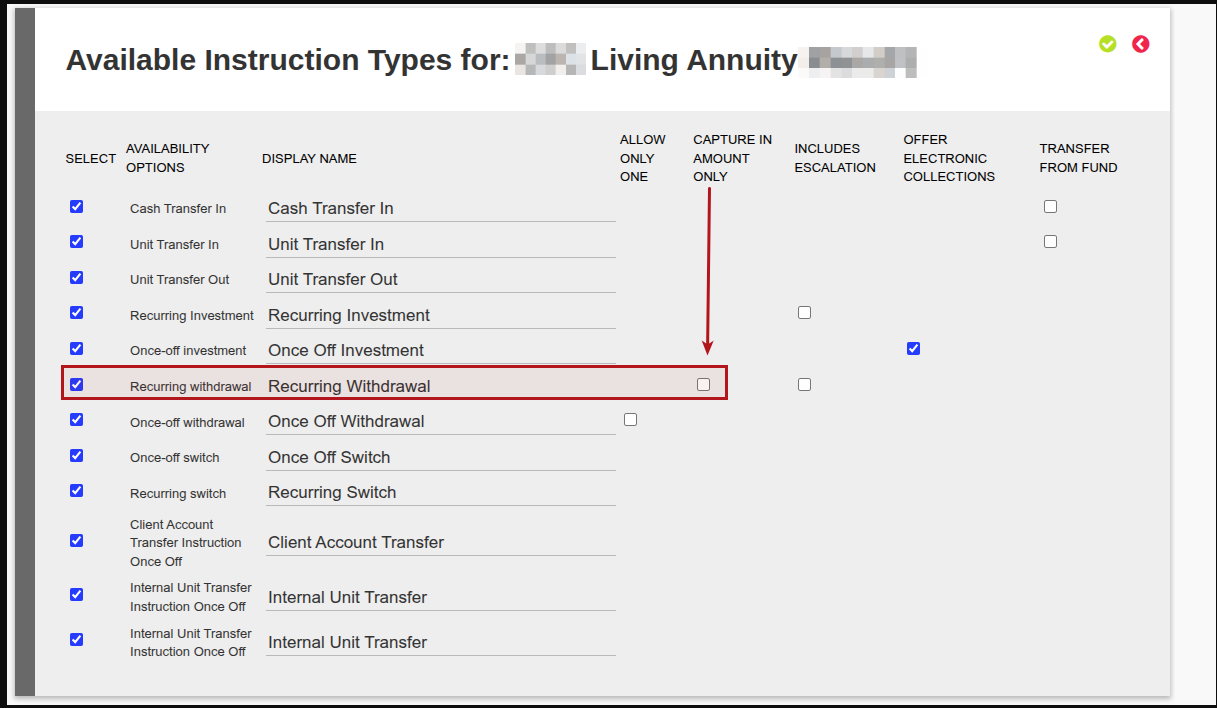
Enable recurring withdrawals to only be captured in Amount and not Percentage: On a product -> More Actions there is Available Instruction Types. If you go into this you will see next to Recurring Withdrawal, there is checkbox for ‘Only allow amount withdrawals’. This ensures that the same amount is deducted for every recurring withdrawal. Current recurring withdrawals in units will remain as is until the recurring withdrawal is rejected, at that stage only amount will be available on the instruction. The ‘Only allow amount withdrawals’ should be switched on for all Living Annuity/Linked Life Annuities/Retirement Income products (52945)
More changes include:
General (Includes Reports, Processes, Message Changes & Validation improvements)
- Report: Added dealer and investor account columns to System -> Supplier Accounts -> More Actions -> Liability accounts per Instrument (52776)
- Updated fields on recurring withdrawal page: commencement date (‘first recurrence’ or ‘next recurrence’ added in brackets), ‘future recurrence day’ indicates date on which withdrawal with recur, ‘next recurrence date’ updates in accordance with the first recurrence and recurrence frequency inputs (52771)
- When changing the commencement date on Recurring Withdrawals (temporarily) the system will automatically check and authorise the recurring withdrawal instructions (52941)
- When creating a new Company Type, a drop down with additional roles has replaced the current tick boxes: “Is Public” & “Fiduciary”. Note: Companies that were set “As Public” have been migrated to the drop down Public Company and Non-Public have been set as “Normal” on the drop down. Companies set as “Fiduciary” have been migrated to the drop down Fiduciary. See link. Additionally if a Company Type is a State Owned Enterprise (SOE) or a Regulated Financial Institution the Risk Assessment question “SOE or organ of state? If regulated financial institution, answer is always “No” will default to “YES”, marking the entity with a High Risk score link (52909)
- Improve performance of distributions on cash instruments (52734)
- Client Statement improvements have been made where clients are invested in Model Portfolios. A new “Model Portfolio Summary” section has been added and will only include all non-zero balance Model Portfolios. The Account Details section will also include all the Model Portfolio names invested in (52926)
- Additional fields added to the bulk member application review spreadsheet, and changes to the landing screen when Adviser accesses member application review screen from sheet. See link (52925; 52924)
- Online applications of new members added to existing employer groups can be emailed to the Adviser or Adviser Assistant directly for review. See link (52920)
- Added a Beneficiary report on Investors -> Contracts -> More Actions -> Beneficiary detail Export. This report contains the following: Contract owner, Contract owner number, Primary/Alternate, Surname, First name, Relationship, ID number, Benefit% (53028)
- Added an automated job for King Price data (52834)
- Improvements have been made on Recurring/Once Off withdrawal screen, these include: a) When working in units, an Estimated Instruction Amount field has been added that reflects the estimated value amount of the units. b) The Effective Tax Rate (if loaded at the Contract level) will be displayed under the Amounts section. c) The ability to Override tax rate calculation method with fixed amount tick box has been added with the ability to process the tax amount (52946)
- On Instrument details, changed the field called Retail Type to Instrument Grouping. Content of the field remains the same. (52935)
- Review Letter functionality added to use a Brokerage Logo. See link (52886)
- Updated money transfer matching functionality to allow matching a lesser amount on receiving account than the amount matched on sending account, to indicate a money transfer fee has been charged by the bank. See link (52888)
- Update to Instrument Instructions screen, can now filter when choosing more than one field Bulk Processes -> Dealer Instructions -> More Actions -> Instrument Instructions (53073)
- Multiple instrument instructions linked to the same bank account entry may be matched to a single bank transaction on the payment batch screen. See link (53042)
Integration (Includes Finswitch, Amazon S3, Azure blob, API, Calestone, Exports)
- Estimated Flows Instructions file has been added to S3 Amazon file. See link (52858)
- On the Institutional API we have added Instrument Instruction Detail which will include the “TO” Instrument details. Refer to the API Change Log -> Institutional API or API Page (52929)
- On the Accounts, Model Manager and Partner API’s we’re now returning Instrument Grouping which gets stored at Instrument level to explain the “type” of fund. Customers can manage their own Instrument Grouping types and the value per instrument. Refer to the API Change Log or API Page (52935)
- Any ID field which is an integer, will no longer return an empty string when it has no value, but rather null. When it does have value, it will still be an integer as before. Refer to the API Change Log or API Page (53103)
- The HasInstrumentInstructions call on the Institutional API has been changed to only consider client instructions as true when the instruction was received before today. Refer to the API Change Log or API Page (53027)
Refer to your online GitLab Project for a full list of changes and enhancements for the release.
Bug Fixes
- 52862 – A validate error will be raised where a debit order is already cancelled by another user
- 52898 – Fee Run failure fixed due to a negative holdings on a Contract
- 52901 – Error resolved on Reports> Cash Recon Report page
- 52831 – Next Review Report email failure error handling has been improved to display the error and will continue to send email batch
- 52971 – Error on Gains Report resolved
- 52936 – Error resolved when processing a withdrawal, then attempting to view the historical transactions
- 52974 – Search function issue has been resolved
- 52983 – Error resolved when viewing Historical Changes on a Contract
- 52964 – Error message added when processing a withdrawal and attempting to amend the bank account currency after processing
- 52991 – Error resolved when Adviser has 2 Brokerage roles and a fee reversal is done and appears on both brokerages
- 53032 – Ensure client can access second page of Third party bank accounts report
- 52928 – Estimated holdings for created switch instruction prior to submitting the switch instruction
- 53033 – Remove duplicated transactions on 2 contracts
- 53044 – Error resolved when attempting to view an ITA88 transaction
- 53005 – Error resolved preventing completion of money transfer on following debit order’s recurrence following a debit order reversal
- 52942 – Ensure debit orders that buys into inflow cash rematches correctly
- 53069 – Error resolved on Fee Control Account
- 53067 – Error resolved on tax reporting
- 53075 – Error resolved when generating a Fee Run
- 52990 – Error resolved second full withdrawal in same month does not include accrued interest
- 53039 – Error resolved when pressing ‘more details’ to view accounts in the InterestAndDividendsCertificates
- 53010 – Error resolved we give a ValidateError or do not try to save the overridden fee if brokerage is nil
- 52969 – Ensure money transfers on client account switches execute
- 53088 – Error on fee portfolio not creating automatic switches
- 53088 – Error on Export Contract Holdings
- 53103 – Error blank unique id (as integer) returns as string now returns as integer
- 53194 – Error resolved with new validation message when transferring existing contract with ready to recur instruction and Adviser to an employer group
Software update can include but is not limited to:
- Bug fixes.
- New and/or enhanced features.
- Further improvement to performance
Last Updated on 6 months ago by otto