
12 Nov Release 202 – Contract level override for tax calculations
Contract level override for tax calculations
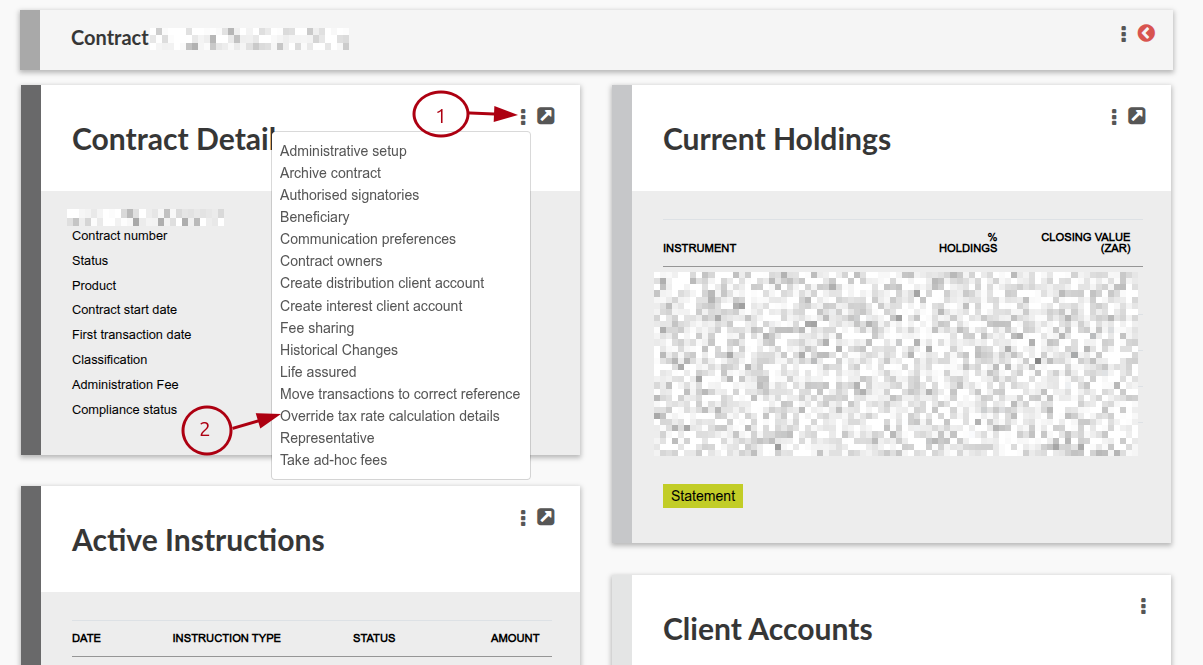
In this release we created functionality where the Tax rate calculation method can be overridden on a contract level in scenarios where the investor has multiple Living Annuity contracts/annuity payments and the tax calculation on each one is distinct. See link [55787]
More changes include:
General (Includes Reports, Processes, Message Changes & Validation improvements)
- Two-Factor Authentication status has been added to the Users > Users Report. See link [55654]
- User accounts with API permissions enabled under User-> Global Permissions will no longer be able to log in via the user interface. Representatives requiring UI access must have individual user profiles created for them by a user with User Admin permissions. See link [55313]
- The ability to cancel a completed investment instruction into cash, or to cancel the initial fee on any completed investment instruction, now has a distinct user permission called “Cancel investments and investment initial fees”. Users with Investor Admin will have this permission by default at go-live. See link to cancel initial fee or link to cancel investment instruction [55714].
- Optimized IBAN (International Bank Account Number) validation to pre-screen international account numbers and prevent downstream processing failures in debit order/collection files via Natwest Integration. [55193]
- On Fee Statement defaults, added the ability to configure the Contract Details of the Brokerage displayed on the Fee Statement; such as whether certain fields are shown or not, the sequence of fields, and the heading label. See link [553760]
- The Entities Bank Account Report now includes the City and Country of the Bank Account, and an option has been added to the report that gives users the choice to include or exclude entities that are not currently linked to active bank accounts when generating the report. [55776]
- The Export Contract’s “Selected fields” list now includes Bank Account City and Country. Users can import entities’ Bank Account City and Country data on the Import Contract page. [55776]
- Detailed drop-down for ‘Reason for dividends tax exemption’ or ‘Reason for interest tax exemption’ will only appear where ‘Dividend withholding tax exempt’ or ‘Interest withholding tax exempt’ is true (Person or Company Details Card -> menu: Tax Details). Furthermore, a mandatory free text field will appear when the selected Reason for exemption is “Other”. See link [55097]
- Where ‘Interest withholding tax exempt’ or ‘Dividend withholding tax exempt’ is set to true, and ‘Reason for interest tax exemption’ or ‘Reason for dividend tax exemption’ is none/empty, the Reason field will be set to ‘Other’ at migration (Person or Company Details Card -> menu: Tax Details) [55097]
- Added the Client Account Number to the Export Contract Holdings Export, it will always be included and is not an optional “selected field”. (55995)
- Added a configuration on the product level to set the AEOI Account Type. This account type is required for the Automatic Exchange of Information (AEOI) SARS file. Available options include, Not Reported, Depository Account, Custodial Account, Cash Value Insurance Contract or Annuity Contract, and Debt or Equity Interest in Investment Equity. See link [55734]
- Updated the Automatic Exchange of Information (AEOI) SARS file to include the Due Diligence Procedure field to reflect whether an account is subject to the New Account or Pre-existing Account due diligence procedures for CRS reporting [55735]
- Added a ‘Self certification provided’ question to the Tax Details screen (Personal Details/Company Details -> More options -> Tax details). The available values are ‘Yes’, ‘No’, ‘Not reported’. Where the value is ‘Yes’, you have the option to upload the self certification document. Where the value is ‘No’ or ‘Not reported’, a reason is required which can be selected from the drop down menu options. In instances where the default country is South Africa, the default migration is ‘Not reported’ and the default reason is ‘Account holder still to be contacted due to timing of identification’. This information is required for the Automatic Exchange of Information (AEOI) SARS file. See link [55733]
- Added the ability for users to set up values that can be selected for Reason for no self certification. These values can added via System -> Countries -> Select Country -> More options -> Reason for no self certification. Once the values have been set up, these options will become available for selection on the Tax Details screen (Personal Details/Company Details -> More options -> Tax details). See link [55733]
- The Export Contract’s ‘Selected fields’ list includes Self certification provided and Reason for no self certification. Users can import entities’ Self certification provided and Reason for no self certification on the Import Contract page.
- NAMPAY Payment file now includes Town Name and Country Code fields in the export, in alignment with Standard Bank’s updated requirements for Namibian payments.[55804]
- No correspondence will be sent on submission and completion of system-created switch instructions for buying/selling models or pots. Correspondence will only be sent for new clients or the first recurrence of an instruction. (For once-off instructions or the first recurrence of a recurring instruction.)[55617]
- Added a contract-level override for tax calculations. On the Contract Details card called ‘Override tax rate calculation details’. This menu option allows you to override the tax rate calculation method set on the entity level (Personal/Company details -> Tax Details ->Tax rate calculation method) for a selected contract. See link [55787]
- Added a validation to the Tax rate calculation method (Tax details menu option) when the Effective tax rate or the Percentage of monthly income rate is selected as 0.00%. The validation will request the user to confirm the 0.00% rate before saving. [55805]
- Added four new fields to the Review Summary card: Annual annuity, Annual tax, Tax per period, Next payment date. [55812]
- Added a new field, ‘Review letter lead time (months)’ to the Product screen for Living Annuity products. This field represents the number of months before the next review date that the review letters should be sent out. [55816]
- Renamed field ‘Business days allowed for response’ on the Product screen to ‘Business days prior to next review date for review letter response’. [55816]
- A checkbox has been added to the ‘Next Review Report’ screen, titled ‘Exclude reviews not within next review letter lead time’. If the checkbox is selected, the report will filter out reviews not within the specified months of the next review date and will include reviews that have already passed the next review date. [55816]
- On Bulk Processes -> Certificates – Income Tax (Annual) -> More Actions, added a report: Income Tax Per Instruction. This report lists each recurring withdrawal and one-off withdrawal in the tax period per contract and indicates the gross income, PAYE, ITA88, and Net income[55669]
- On Investors -> Contracts page, “only show active contracts” is now selected by default. Also added a checkbox to “Include Accrued Interest, Fees, and Taxes” which are excluded by default. [55740]
- Added a configuration to turn off automated matching for client investment instructions in status “New”. See link [55666]
- Added Receiving Entity, Recipient Email, Brokerage Code and Brokerage name to the results of ‘Emails sent to the following recipients on the last run’ for the ‘Automatic Email Fee Statements Job’. See link [55247]
- Added the functionality to automatically upload Payment files to and download Payment Confirmation files from Rand Merchant Bank for NamPay; see link [55414]
- Regulation 28 validation on employer group contribution submissions and authorisations for recurring instructions will now only be performed when the instruction is new, or when the fund selection has changed since the previous recurrence. See link [55895, 56001]
- Added Main contract owner client number to Asset under management list. {Instrument Provider Card -> AUM snapshot for fee calculation} [55987]
- In the Group Scheme online application process, you can now specify that you don’t want to nominate any beneficiaries (55882)
- Added declined insurance debit orders to the Insurance Instruments card on a contract. See link [55923]
- Improved the validation when importing ad-hoc fees to indicate an error when a fee is a negative value in the import file. See link [55559]
- Commission runs now automatically display a total commission figure — both on the runs list and the run detail screen — eliminating the need for administrators to manually download and sum reports to determine the overall commission amount.[55688]
- The Nedbank Statement import format changes have been implemented [55715]
- Ability to specify the commission % and cash instrument where commission earned transactions must be written to on fee portfolios, if commission is distributed based on imported Management Fees. (55689) See link.
- Added “Should use to supplement pension” checkbox/option to Compulsory Income items within the Financial Needs Analysis module. See link [55668]
- Sentence case applied to field labels on Policy Document template [55713]
- Added the “Type” field to the CIL Integration Import Instrument Instructions [55893]
- MSC Transaction Type added to the Natwest Bank Statement Import [55718]
- The Finswitch Asset Allocation Import has been updated to use the Import name as configured on the Asset Class when matching columns in the import file. See link [55978]
- For the Finworks Support Team: The “zero transaction” option has been replaced with “Cancel and Hide” functionality. Executing this will automatically generate a contra entry and omit the transaction from the client statement. [55474]
- Limited special character input to minimise security risks. See link [55910]
- We have updated how zeroed transactions are recorded to adhere to accounting best practices by restoring previously zeroed transactions to their original version, with units, prices, and amount values. We added a cancelling transaction to each updated zeroed transaction to bring the net effect back to zero [55510]
- Added the functionality to set up multiple cash instruments as deposit accounts at Product level. (per currency) See link [55985]
- An additional drop down field called “Country of ID Document” has been added on Individual contract owners. This is to ensure the Account Holder Identification Type is correctly reported to the South African Revenue Services (SARS). This new field has been added to the Import/Export Contracts as well as the Entities API. See link & link [55701]
- Historical Exchange Accounts on the Working Portfolio are now configurable at the Product level (enabled or disabled), and Finworks Support users can now remove Historical Exchange Transactions. See link link [55904]
- ‘Expected Asset Allocation’ table now reflects on the Asset Allocations screen (instruction – menu – Asset Allocations) whether the configuration uses ‘intended maximum limits’ or ‘actual asset allocations’ on instruments. Previously, this table was only displayed where ‘intended maximum limits’ were set on one or more instruments [55957]
Non-functional System Updates
- We now have the ability to restore a masked database to our test environments, which masks all personal identifiable information, excluding username and transaction details. (55750)
- Code refactoring on the Quote process; please ensure your process continues to work as expected (55823)
- Code refactoring on User Historical Changes (55823)
- Various front-end code refactoring – non-functional impact. (54078)
- Any drop-down list which contains more than 1000 options will only display “Too many options to display” (56055)
- We upgraded Bootstrap (the underlying framework) and replaced Isotope (the lay-out plugin) with Bootstrap cards on client websites. This modernises how data is structured on screens. Menus and buttons and data tables should look and operate just as they did before, because everything has been configured to match previous screens (52061)
- Increased the Surname and First name(s) field length to 100 characters [55653]
Post-Release Actions
- System > Configuration: Untick “Allow new instructions to be matched automatically” if required. See link [55666]
- Users with API permissions or an active fingerprint will no longer be able to log in via the user interface. To identify users with API permissions: Users -> download user permissions -> filter for “API” column F ‘SOBJECTMEMBERDESCRIPTION’, remove API permissions from users who are not API users for the user to log in via the user interface. See link [55313]
- Update the filename selection and the file order for the Export Transaction Data Job > System -> Jobs ->Export Transaction Data Job [56061]
Integration (Includes Finswitch, Amazon S3, Azure blob, API, Calestone, Exports)
For all API related changes, please refer to the Change Log and for our comprehensive API documentation refer to this page: Application Program Interface (API).
For our comprehensive documentation on Data Exports, refer to Export Transaction Data Job (Amazon S3 Bucket or Azure Blob Storage)
- API users with an Inactive status will receive a 403 Security error response when attempting to send calls [55313]
- Added the ability in the Instructions API -> Create a Switch to load a switch on a specific Client Account/Pot. If not specified, the instruction will be created on the default client account. [55974]
- Added identificationDocumentCountry to Create Person call on the Entities API, and also on Create Account and Person on the Accounts API. This enables us to do South African ID Validation in the correct scenarios. Where identificationDocumentType is Identity Document and identificationDocumentCountry is ZA, or if the default country on the system is South Africa. (55701)
- Payment file format for Diamond Trust Bank now available (55664)
- Added the functionality to the Accounts API (Create investment and Update recurring investment calls) to select the bank details when creating or updating a recurring investment. This functionality allows you to select an existing bank account on the system and will not allow you to create new bank details.[55667]
- Added the ability to specify “dividendWithholdingTaxExempt” and “interestWithholdingTaxExempt” as well as reason codes and reason descriptions, via Create Person, Create Company and Update Entity [55097]
- Added the ability to set the “reasonForInterestTaxExemptionDescription” and “reasonForDividendTaxExemptionDescription” via Create Person, Create Company and Update Entity. This is required where the “reasonFor{Interest/Dividend}TaxExemptionCode” is “Other” [55857]
- The following fields have been deprecated on the Entities API: “withholdingTaxExempt” and “reasonForTaxExemptionCode” [55097,55857]
- The Create Advisor call, when creating a person, will now validate whether a valid South African ID was provided if identificationDocumentType is Identity Document and identificationDocumentCountry is ZA, or if those fields aren’t provided and the default country on the system configuration is South Africa. [54722]
- Added a delimiter before “Reg28 Issuer ComplianceFailureReason” in responses received via the Regulation 28 Compliance endpoint on the Accounts API [56023]
- ‘Regulation 28 status for new accounts’ endpoint considers the asset allocation on the sub-classes of the instrument/s included in the call, the asset allocation of the parent asset classes was previously considered in the validation [55362]
- The Export Transaction Data Job has been updated to send each file to the Amazon S3 Bucket or Azure blob storage after each file is processed. Previously, files were delivered as a complete batch once all processing was completed. In addition, you now have the ability to select the files you want to export and in which order. The default migration is that all files are selected with the exception of ‘all-instructions’, ‘all-transactions’, ‘all-fee-transactions’ and ‘all-user-audit-data’. See link [56061]
- On the Supplier, Instrument Summary Card, the switch in transaction units will be reflected [53925]
- Axis titles missing on graphs on statements on a specific instance as a result of a styling issue (55864)
- Fixed duplication of Requirement Types on System -> Requirement Types menu (54985)
- WHD SARS File was not considering transactions on the declaration date when determining the number of shares. The applicable tax rate is also now correctly found for an investor, considering investor level overrides and exemptions. (55768)
- Error resolved when viewing the Money Transfer Report [55684]
- Fix for user permission changes not pulling through in Users > Users > Historical changes [55722]
- Duplication error resolved when loading an Amortise Initial Fee transaction [55775]
- Fix withdrawal blocked units double-counting model-portfolio holdings on contracts with model-linked client accounts (56077)
- Error resolved when an Online User loaded a Beneficiary [55660]
- Error resolved when creating a duplicate User [55745]
- Manually identified bank entry no longer reflects on returns when unmatched [54887]
- Statements Imported Today click + no longer causes a Glass error [55756]
- Realised and unrealised gains report on Supplier Instruments, invalid float will not cause Glass error [55738]
- Updated warning message when attempting to set the contract owner as beneficiary on contract [55560]
- Income % p.a at review value displayed on statement corrected (previously displayed Reviews card’s ‘current income % p.a’ value)[55661]
- Error resolved when on a model portfolio switch, there are some of the sell legs that have been confirmed and others not and the cash from the confirmed sell legs is available. This cash is now booked for the buy leg of the switch[55874]
- Error on Export Transaction Data Job resolved [55813]
- The reason for tax exemption on an entity reference is now saved instead of the code and reason. If the code on an existing reason is updated, this will no longer clear the existing reason and code set on an Entity (Countries -> Reasons for Dividend Tax Exemption or Reasons for Interest Tax Exemption)[55097]
- When generating a statement from the Contract Holdings card, if no price is available for an instrument, a ‘No Price Available’ error now displays, reflecting the instrument name and the date of the missing price [55737]
- Update to use the default transaction notification statement period (in days) as set on the statement defaults[55780]
- Compliance Issuer error on Amortisation and Insurance Instruments resolved [55876]
- Update Client number on Instrument Provider Download Transactions Report [55925]
- Add Client Number to the Detailed Instrument Account Holdings Report [55763]
- Ensure that the configuration shows on Google Authenticator [55725]
- Valuation report now displays all columns [55884]
- A pop-up notification has been implemented on the Dealer Instruction Create screen to alert users when no transaction lines have been pre-selected, ensuring clarity during the bulk process creation workflow. (55894)
- Once-off investment in status NEW buying into model portfolio, VIEW QUOTE caused Glass error [55988]
- Error resolved when generating the Interest and Dividends Certificate for historical distributions with missing distribution splits, which now correctly return zero instead of triggering an error [55698]
- Fixed bugs in Tax Free Product lifetime and annual limit validations [55612]
- Error on Client Account Transfer Instruction resolved [55953]
- Unitised instrument not displaying in the search results [55610]
- Error on investor statement Section Selection for Policy document has been fixed. Navigate to Contract > More actions > Holdings card > Statement > Choose sections. The Policy document option is now displayed on the Choose sections menu only when a client has configured the Policy documents Document type for the product/s and switched on ‘Can generate policy document’ on the product. If a client is not using the document type, the Policy document option is not available for selection when generating a statement [56007]
- Fix Glass error when going to Asset allocations on a withdrawal, giving error of a Sell does not understand Instrument [55958]
- POM error resolved when processing the Annual Fee Run [55717]
- Fixed bug where compliance status changes disappear on Historical Changes page when a requirement is marked non-compliant [55473]
- Ensure reset password redirects to login page [55726]
- Legal entity types merged into Company types and added field LegalEntityTypeCode [55783]
- Fixed error when importing historical transaction import due to hide transaction functionality [56062]
- Fixed Glass error when the bank entries matched is in a different currency that the instrument instruction [55920]
- Ensure system does not do to and from forex conversion on a buy where to and from instrument have different currencies and the Custodian does not have a bank account in the to instrument currency [55691]
- Fixed rounding errors in withdrawal and capture validations by converting incoming JSON values to exact Amount objects instead of comparing via asFloat[55886]
Refer to your online GitLab Project for a full list of changes and enhancements for the release, and refer to our GitLab help file if required here.
Bug Fixes
Software updates can include, but are not limited to:
- Bug fixes.
- New and/or enhanced features.
- Further improvement to performance
Last Updated on 1 day ago by Hayley Jerram