
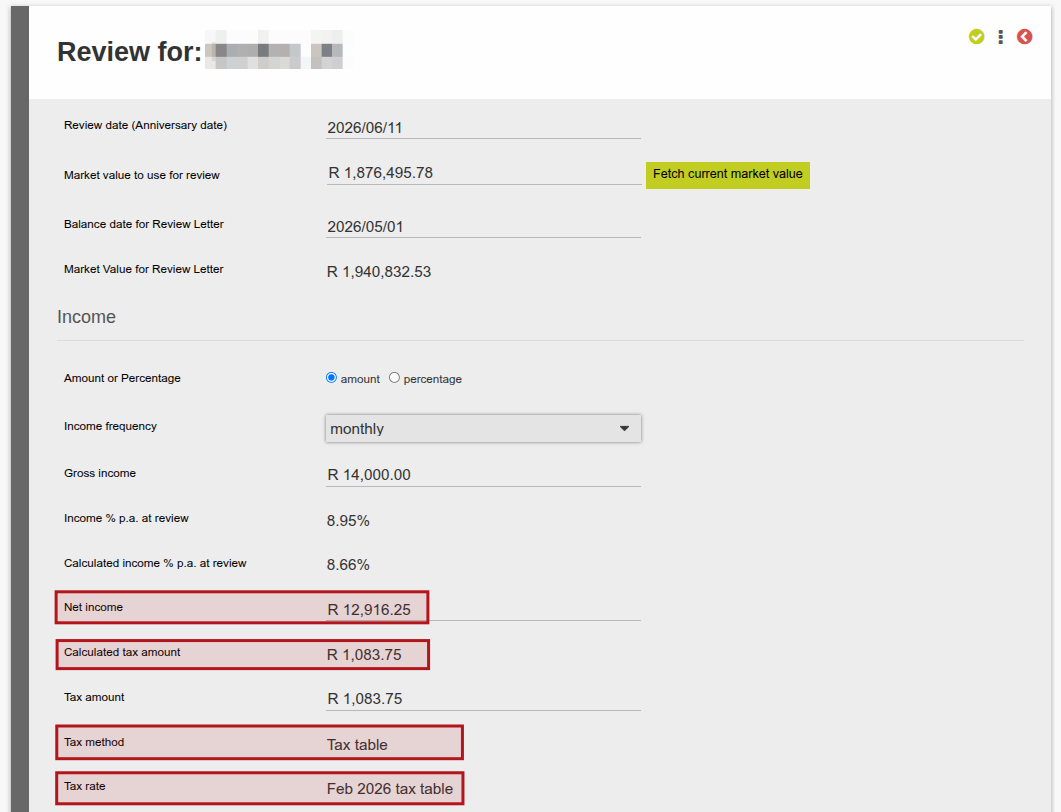
25 Feb Release February 2026 – Net Income and Tax now calculated on Review
Net Income and Tax now calculated on Review
The Net Income Amount is now calculated using the calculated tax due , and can be included in the Review letter, client statement and visible on the Review card
Tax Related information is now visible on a Review (link) which will update the net income (link), and can be included in the Review letter (link) and client statement (link) (54075)
More changes include:
General (Includes Reports, Processes, Message Changes & Validation improvements)
- Added an Assets Under Management (AUM) Graph to the Brokerage and Adviser dashboard, see link (54030)
- You can now choose the “Up Until” Transaction date of transactions included in a fee statement, when using the Automatically send fee statement per email job (54460), see link
- Improved capturing of the pot allocation on a Cash Transfer In, to allow you to choose to capture in Amount or Percentage (54458), see link.
- The Capital Gains Certificate (IT3(C)) has been enhanced to enable more variability in styling (54220), see link
- You can now switch from a model portfolio to a fund, even if the model portfolio investment spans across different pre-retirement pots (54303)
- Change to Notification Messages where we display the Initials, it will always be displayed as Uppercase (54207)
- Ability to change an Entity from a Person to a Company or a Company to a Person, with the appropriate removal of associated roles, see link (53503)
- “Upload Contract Notes” will now run in the background with all results visible when done; instead of requiring the user to Confirm lines that they want to import, the system will by default import all lines where there is no error, warnings are still imported, see link. (54491)
- On the System > Statement Defaults, under the Combined cash instrument transactions per currency section, the option to Override initial fee description has been updated to include all initial fees (54089)
- Set up for SARS files for IT3s, Contributions and PAYE Recon, see link (53776)
- Warning when capturing a 100% withdrawal where one or more instruments on the contract has a negative balance that accrued fees cannot be taken, see link (54374)
- Created functionality to withhold interest withholding tax for non- residents, see link (54349)
- Importing of Rejected “Confirmation of Transactions Requests” from Finswitch using Upload Contract Notes will now show an instrument instruction status as Rejected when a rejection is received in this import, after which the instrument instruction can manually be cancelled or confirmed (54311).
- Finworks staff unmatch feature has been improved on Payments, to move the instruction (client withdrawal or buy instrument instruction) to its previous state when unmatched. Also removed the Unmatch button from a Bank Entry (54281)
- Finworks staff cancel of completed money transfer feature has been improved. See link (54327)
- Added Debit order batch status ‘Cancelled’ (54544), See link.
- As part of the Financial Analysis Needs Analysis added an option to show both Annual drawdown (Without Supplemented Income) {Previously: Actual drawdown rate} as well as Annual drawdown (With Supplemented Income) {New column added} see link for more on the Financial Analysis Needs Analysis (54297)
- Unit values on debit order reversal transactions will be updated automatically when the units on a dealer instruction are amended, see link. (53186)
- On the Instrument Provider page the Assets Under Management (AUM) graph has been moved from the main screen to the Instrument Provider Card -> More Actions -> Assets under management , see link. (54522)
- Removed the Client Account selection from the Cash Transfer in screen as this is now controlled via the Pot Allocation selection, refer to the Cash Transfer in during a Sectional Transfer, see link (54495)
- You can change a Portfolio Instrument with no Composed Contract, related transactions or instructions to a Unitised Instrument using Change Kind (54208). See link
- Added option to remove a Fee provision instrument from System->Fee provision setup. See B in link (54271)
- If a Performance Fee transaction is zero’d, the code has been enhanced to now ignore those zero’d transactions as if fees hadn’t been taken yet. (54421)
- The Brokerage and Adviser dashboard has been streamlined. See link for changes (54029)
- New Payment File format for Standard Chartered which enables Mobile payments (54090), see link
- Update to config-specific Historical Transactions Import -> Import Holdings Summary to move units from model client account to the default if the contract is not in a model anymore, see link (54411)
- Ability to set withholding tax exemptions separately for dividends and interest. See link (54578)
- Additional options added to System -> Needs Analysis Defaults including logo, alignment and size of logo. See link (54385)
- We will now notify specified Finworks Support Team members via SMS of system errors to ensure errors are dealt with timeously, System-> Configuration-> SMS numbers for internal SMS messages (54553)
- On the Import/Export Fee Sharing, the ability has been added to specify the Ahoc Fee Type, Recipient Type (contract (fee portfolio), brokerage, advisor, distributor), Recipient code (contract number (fee portfolio) or code). See link on existing process (54152)
- New setting available on Advisers: ‘Should review complete online application for clients’, allowing Advisers to review and update applications before sending the application members. The existing system-level setting ‘Should send online request to advisor’ dictates whether the Adviser’s setting is true or false when the Adviser is created. See link (54603)
- The columns displayed in the ‘Employees’ table on the Contribution Instruction screen can now be customized using the menu on the page -> ‘Setup columns’. A ‘Total Contribution’ column has been added, and the existing Contribution column has been relabeled as ‘Net Contribution’ which reflects the contribution less initial fees. See link (54302)
- For retirement products you can now deactivate Components where they are not applicable i.e. Vested benefits components pre September 2024 and pre March 2021. Go to System->Product->more actions->Pots (54248)
Integration (Includes Finswitch, Amazon S3, Azure blob, API, Calestone, Exports)
For all API related changes, refer to the Change Log for a detailed list of changes made, including tags added/changed/deprecated and to <a href=”https://finworks.biz/application-program-interface”>Application Program Interface (API)</a> for detailed documentation of all calls.
- Export Transactions update (S3 or Azure Blob storage). Refer to Export Transaction Data Job (Amazon S3 Bucket or Azure Blob Storage). (NOTE: No changes in this release)
- Fetching the list of Banks on the Accounts API is now only dependent on access to the Accounts API (54345).
- When sending messages to the AWS message queue and either the content is blank or it’s not the same as what was intended, we will store this as a failure on our side. (54394)
- Failed messages sent to AWS message queue are now visible on the front-end and all messages sent can be exported from the front-end, see link. (54388)
- Improved run time on S3 export transactions job (53773)
- New option on the Advisors API to request Assets Under Management (AUM) graph data points on Advisor or Brokerage level with or without the pagination option, see link. (54031)
- Specify whether instrument prices are allowed to be updated via Finswitch, see link. (54633)
- Added the ability to specify on the Export Transactions Data (S3) job how many days to include in the estimated flows file. See link (54570)
- Improved error message when submitting beneficiaries “value” field as an integer instead of as a string, see link. (54494)
- On the Accounts API, on Fee Sharing: we have added the ability to specify a Recipient Type (Advisor/Brokerage/Distributor/Contract (fee portfolio)) (54149)
Refer to your online GitLab Project for a full list of changes and enhancements for the release, and refer to our GitLab help file if required here.
Bug Fixes
- Fixed Brokerage Logo use on Tax Certificates to use all logo related settings as defined on Company of Brokerage instead of Product defaults (54310).
- Policy document generation button was showing on the generated pdf which has now been removed. (54508)
- Ensured fees can be accrued on fee run without giving memory error (54285)
- Resolved error on instruction if amount in ‘Pot Allocation’ section is blank (54333) (54381)
- Resolved error when trying to confirm a dealer instruction (54329) (54338)
- Resolved error on an instruction when adding a amount to any of the components in the “Pot Allocation’ but no amount is specified on the instruction (54326)
- Error resolved when generating quote documents (54316)
- Error resolved when accessing ‘Gains’ screen via supplier instrument account which has go gains entries (54087)
- Confirmed Dealer Instruction status now reflecting correctly as Confirmed (54354)
- Ensured the correct fee accrual start date is used after a previous fee run has been done on a contract (54362)
- Ensured that a withdrawal can be batched if there is enough cash available in the correct cash instrument account for the withdrawal (54226)
- Ensured that if an instruction that has been submitted and is rejected the instruction is unmatched and will need to be matched again(54373)
- Ensure that Investment summary card and returns card on client contracts display graphs (54160)
- POM Error resolved on the Automatic Email Statement Job (53986)
- Market Value of all client accounts not returned on Brokerage API resolved (54387)
- Error resolved when viewing a fee sharing split on a Brokerage/Distributor (54410)
- Error resolved when adding and removing Instruction Groups (54403)
- Email Quota error resolved on Automatic Email Statements Job (54340)
- First system fee date on import error resolved (54375)
- MessagenotUnderstood Error resolved on Export Contracts, Fee Splits Report (54423)
- Online Application Error resolved (54370)
- Error resolved on the asset holder custodian (54370)
- Gain/Loss on Capital Gains event now reflecting correctly (54234)
- Change to Buy and Sell instruction order for Capital gains realization correction. (54426)
- Optimization done to prevent error from occuring when a successful login occurs at the same time as an external processing job, now the successful login email will be sent as part of the external processing job rather instead of sending immediately and causing contention. (54430)
- Correction on currency of an existing bank account error when importing contracts. (53845)
- Error resolved of accruing fees while a 100% withdrawal is processing (53716)
- Error received when trying to do a stop buy on an instruction resolved (54530)
- Avior Distribution Issue on Liability import correction of job failure (54480)
- Error resolved where rejecting a recurring instruction and resubmitting it would fail (54548)
- Error when two users simultaneously attempts to unmatch a payment corrected with on screen validation message (54521)
- Field name changed from ‘Volantary contribution’ to ‘Voluntary contribution’ on employer settings, investor instruction screen, contract import, and upload employees for employer screen (54300)
- Fixed error where “Needs Analysis Graph” not populating completely in PDF. (54524)
- Error resolved when exporting transactions via investors -> export transactions (53790)
- Error resolved when confirming an instrument instruction with a zero price/amount (54569)
- Double counting error resolved when using Tax Certificates(Monthly) screen for monthly PAYE (54445)
- Error resolved when attempting to do an adjustment from a Model Portfolio to a Client Account (54533)
- Error resolved when attempting to change date and view approved change requests (54559)
- Error when manually confirming dealer instruction resolved (54585)
- Error resolved when attempting to access and download Guardrisk annuity payment report (54007)
- Issue fixed whereby Change Product retains the old product name if the investor is invested in a model portfolio (53714)
- Issue resolved where initial administration fee could not be changed on product (54589)
- State transitions added to allow status of dealer instructions to update correctly (54575)
- Error resolved when submitting a new investment instruction (54607)
- Error when adding an employee to group scheme where client already exists on system and has outstanding fees corrected (54252)
- Ensure that a debit order instruction with debit order status ‘Declined’ can be cancelled (54545)
- Ensure there are no existing instances where data fixes or un-matching of bank entries resulted in a discrepancy between bank entries and amounts on client holdings (54346) (54625)
- Error when submitting a switch corrected where duplicate instruments accounts are present (54641)
- Error when submitting withdrawal that has 0.00 sell proportionally over all available instruments in corrected (54650)
- Duplicated distribution transaction error resolved (54606)
- Error corrected where matching payment when tax table is not availible gives a validation message and fails to match (54648)
- Error corrected where matching payment does not understand amount or estimated amount (54671)
- Changed default “Override ALL emails to” addresses for Jubilee test site (54400)
- Money market and cash instrument sells where rounding occurred executed just over or just under the requested amount which when under sold, led to Payments not being able to be included in Payment batch since the amount sold differed from the amount requested (54489).
- Moving existing contract to a different employer group will no longer result in the existing recurring instruction and an additional recurring instruction being created, only the existing recurring instruction will now reflect (53204)
- Selecting or deselecting ‘Policy Document’ section under system’s statement defaults will no longer impact the same statement section’s selection on a product’s statement default settings (54598)
- Error resolved on validation error when automatching bank entries where a malformed deposit instance has been identified (54453)
- Green tick icon was incorrectly displayed on It3b certificates, and has been corrected (54610)
- Ensure ‘nil’ does not appear in a fee run as error under unprocessed fees (54253)
- The field names indicating benchmark information displayed on statements has been updated to sentence case (54768)
Software update can include but is not limited to:
- Bug fixes.
- New and/or enhanced features.
- Further improvement to performance
Last Updated on 5 months ago by Tinus Burger