
16 Jun Release June 2026 – User Permission Groups for Global Permissions
User Permission Groups for Global Permissions
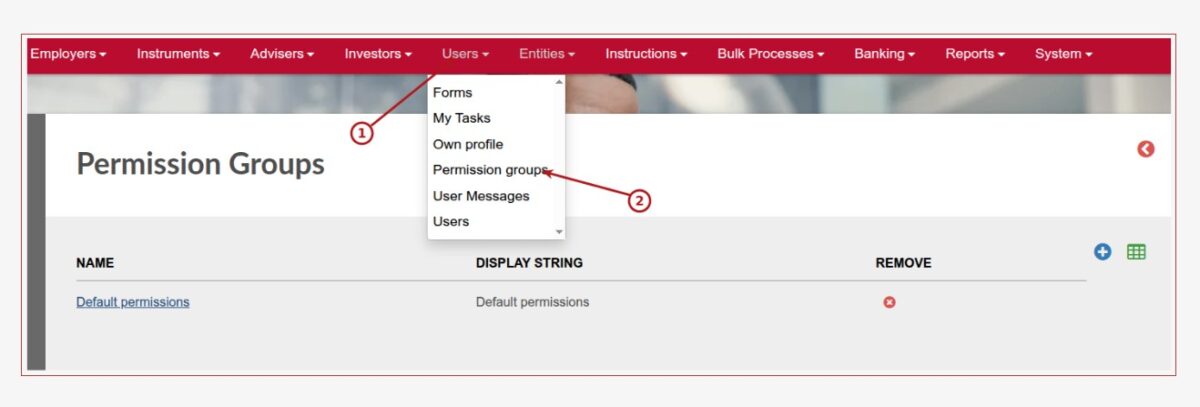
In this release we created functionality to enable a user administrator to setup and assign permission groups to users.
User permission groups can be setup once and then assigned to users dependent on the function/role of the user. The administrator can configure each permission group with the appropriate permissions once and then apply one or more permission groups to a user, instead of assigning permissions to each user separately. See link (54850)
More changes include:
General (Includes Reports, Processes, Message Changes & Validation improvements)
- Created debit order reversals report for NatWest host to host process. See link (54943) (55075)
- Changed validation on Natwest bank statement import to make provision for the changes in Natwest bank statement format (55049)
- Functionality added to Natwest ISO 20022 Debit Order jobs to manually be triggered (55054)
- Added functionality to generate surrender letters manually on 100% withdrawals. See note in link (54981)
- The Accrued Fees report will run in the background, enabling a user to continue working. When returning to the Accrued Fees report, the report run for the specified period will be available. (54701)
- To improve performance the Bulk processes->Fees Annual screen has been split in two. To do a fee run select the ‘Accrued fees’ button on the Bulk processes->Fees Annual screen. See link (54701)
- Where Finworks Support Team reverse an initial fee on a completed Once off investment, the originating Once off investment will be updated to reflect the 0% Initial Fee (54965)
- The iPayment Payment upload has been changed to reflect the Bank Account Holder name loaded instead of the Contract Entity name (54754)
- When Finworks Support Team reverse initial fees on Amortisation or removing the Amortisation period, the originating Instruction will be updated to reflect the 0% Fee/Amortisation Period (54862)
- Added the functionality on Import/Export Contracts to update the Advisor Communication Preference, see link (52764)
- Added the functionality to load a fee share on an Ad-hoc fee, see link (53627)
- Added the functionality to import Share Instruments, see link (52956)
- User Permission Migration for Broker and Advisor Cards: We have completed a migration of user permissions following our recent updates to the Broker and Advisor cards. We have moved where this data is accessed to allow for more granular control over system permissions. Any users who previously had access to these features on the Broker and Advisor cards will retain their access. They can still see and use everything they could before, only the underlying location of the data has changed (54781)
- ‘Select all’ checkbox is now available in each user permission section: user card -> menu: Global Permissions -> each group of permissions now includes a ‘select all’ checkbox’ for ease of use when allocating or removing permissions. See link (54869)
- ‘Group Permissions’ menu option on User card is now labelled ‘Employer Group Permissions’: User card -> menu: ‘Employer Group Permissions’ (54869)
- New section ‘Settings’ and setting ‘show individual permissions’ has been added on Global Permissions screen, when selected all individual permissions in each permission group are displayed, when deselected all individual permissions are collapsed and only permission group label can be seen. See link (54869)
- Changes made to an Employer’s default investment instruments can be viewed via the new Historical Changes menu option on the Default Model Portfolio screen, accessed via: Employer card -> view details -> select ‘Default Investment Instruments’ -> instrument splits -> Default Model Portfolio screen: menu -> Historical Changes’. See link (55038)
- New withdrawal validations restrict the Savings component to one annual withdrawal of at least 2,000.00, while keeping existing, unrestricted defaults for all other Pots. See link (54916)
- You can now mask or partially mask sensitive data within communications by navigating to System -> Notification Templates and updating the desired data field with the mask command followed by the number of characters to hide (for example, changing {firstName} to {mask 5 firstName}). See link (55175,54899)
- If multiple distribution transactions exist on a contract, these are combined into a single line item in the SARS DWT Submission File. See link to generate the file, and link to access the file (55167)
- The ‘FeesThatWillBePaidSection’ (displayed on an Investment Illustration generated for an Employer) can now be edited via the Product’s Document Template settings. System -> products -> select product -> menu: Document template -> select Investment Illustration -> FeesThatWillBePaidSection template -> edit as required (54555)
- Validation has been improved to warn against and reject duplicate Fee labels when editing Fee labels on existing Fee types or creating new Fee Types: System -> Fee Types. See link (55186)
- iPayment batch files will populate with the bank account number and not the investor’s contact number where ‘is mobile banking’ is selected on the bank account type (Banking -> bank account types -> click into an existing bank account type or create a new type -> select ‘is mobile banking’ checkbox to enable). See link (55205)
- Various list views have been migrated. This is a structural refactoring — no functional or visual changes are expected. List should display the same columns, headings, and data as before (54938)
- Enhancement to BND validation to generate warnings for blank postal codes when using Beneficial Interest Register Nominee report (reports -> Beneficial Interest Register Nominee report -> validate File). See link (55221)
- Enhanced the validation of Annual and lifetime contribution limits on tax-free products when submitting an instruction to consider the combined annual and lifetime contributions across all contracts owned by an investor in the same tax-free product. See link (54794)
- The Returns card now defaults to a 3-year date range, with Cash flows and returns screen (Returns card ? View Details) defaulting to 1 year, and Cash Flows is now accessible as a menu option directly on the Returns card; selected values have also been cached to achieve faster performance in these areas. See link (55042)
- An option has been added to the Automatic Email Fee Statements Job to only send commission statements to brokerages if there were transactions in the statement period. See link (55209)
- Logic enhanced to consider the amount of the bank entry when matching background process identifies multiple possible matches (Banking -> import bank statement -> import file -> matching background process is initiated). See link (55190)
- Enhancement to SMS functionality and also added a scheduled job enabling a user if needed to deactivate the job, when deactivated SMS’s will not be sent. The SMS Sending job is created and actived automatically after deployment – no configuration is required. It appears under Scheduled Jobs for all clients and runs only when there are SMS notifications to be sent. Just to note: if the job is deactivated, SMS notifications will not be sent until it is activated again. (53037)
- Foxit has been added as an additional option to system -> configuration -> external systems where the options are now ‘Docusign’, ‘Foxit’ or ‘Manual’ (previously only ‘Docusign’). Any clients wishing to use the Foxit option should contact support@finworks.biz for assistance with the necessary set up. Default migration will have ‘manual’ checkbox selected where the original ‘Docusign’ option was deselected, and ‘Docusign’ checkbox will be selected where this was selected prior to the release (54707)
- Added functionality to Show History on the bank import screen. See link (55241)
- Enhancement to price file imports to run the confirmation in the background, and import file lines in batches for efficient processing (55052)
- New Risk Assessment Setup Type ‘Nationality Fields For High Risk Country’ has been added: System -> Risk Assessment Setup, allowing users to configure which nationality and address fields on entities are used in the risk assessment of the entity. The default selection on migration is Registered country and Registered address country for companies, and Nationality and Residential address country for individuals. See link (55174)
- Changed Finswitch confirmation file to exclude instrument holdings that have a zero opening balance and no instructions (54976)
- Added functionality to remove a brokerage from a company. See link (55113)
- New Client Take On process available where a new investor can complete their personal and required investment information to result in the entity, contract and investment instruction being created on the system without the investor being a user or logging in on the system. See link (54712)
- For products with separate owner and asset holder custodians, interest transactions on withdrawal instructions are now written from the owner custodian’s working portfolio. See link (55090)
Integration (Includes Finswitch, Amazon S3, Azure blob, API, Calestone, Exports)
- For API related changes refer to the API Change Log and individual Application Program Interface (API) documents.
- Export Transactions update (S3 or Azure Blob storage). No changes in the release refer to Export Transaction Data Job (Amazon S3 Bucket or Azure Blob Storage). (GitLab ID)
- Create withdrawal API updated to allow you to capture withdrawal from a specific client account, note that Pot validations will apply, validations restrict the Savings component to one annual withdrawal of at least 2,000.00, while keeping existing, unrestricted defaults for all other Pots. Refer to link (54917)
- Value available for withdrawal added to the Accounts API, note that Pot validations will apply, validations restrict the Savings component to one annual withdrawal of at least 2,000.00, while keeping existing, unrestricted defaults for all other Pots. Refer to link (55114)
Refer to your online GitLab Project for a full list of changes and enhancements for the release, and refer to our GitLab help file if required here.
Bug Fixes
- Fixed error on NatWest Bank statement import (54982)
- Fixed error on 100% internal switches where the instrument has ‘Round units down’ (54953)
- Fixed error on sending out a surrender letter again (54948)
- Improved automatching code when there is 1 collection from a bank account for 2 contacts (54733)
- Corrected error were surname was not understood by system (55003)
- Corrected offset error when accessing annuity report (54988)
- Correcter error when loading fee split (54991)
- Corrected error received when removing tax amount on review (55057)
- Corrected error where object does not understand zero (55047)
- When cancelling a withdrawal instruction, all withdrawal fees will also be cancelled (55051)
- Corrected decimal place count on disability cash flow calculations (54301)
- When cancelling a Once off Premium on a Model Portfolio with a Premium Fee, the premium fee transaction will reverse (54786)
- Ensure second recurring investment is create as Amortise initial fees ‘no’, if first recurring investment indicated Amortise initial fees ‘no’ (54969)
- Added validation to Natwest host to host integration where account owner name contains accented characters (54993)
- Corrected error where system could not complete task due to 2 different instrument accounts being present (55082)
- Corrected error where day of week is left blank on scheduled job run(55081)
- Resolved error when generating SARS file from Interest and Dividend Tax Certificates screen, additional commit statements have been added so that memory is used more effectively (55110)
- Corrected error on broken link for investment values on employer holdings report (55123)
- Ensure cloudflare does not prevent the uploading of unproblematic documents (54236)
- Error resolved when removing tax on Review (55138)
- Error resolved on blank screen appearing on the New Accounts report. New Accounts Report has been moved as a Background process to resolve this error (53926)
- Corrected error by making draw down rate and required monthly income mandatory fields on the UI (55151)
- Corrected error where SARS file did not download correctly (55176)
- Corrected error where bank entries could not be matched (55136)
- Added better error handling on review card in terms of tax field (55155)
- Corrected error where custodian is different than the asset holder custodian on the product (55164)
- Scheduled run time on Automatic Payment of Fees job no longer updates to timestamp when the job is clicked into by a user (55159)
- Label corrected on ‘Applies only for non-residents’ radio button(previously: ‘Applies only only for non-residents’) where distribution category -> ‘has dividend withholdings tax’ is selected(54966)
- Set Channel Identifier to CD on Custodians where none was set (55154)
- Corrected the Active Recurring Instructions section on statements to reflect the total premium split (55220)
- Error resolved when selecting ‘Cash Flows’ from menu on ‘Additional Information for’ screen (Personal details -> menu: additional details -> menu: cash flows) (55240)
- Fixed a concurrency handling issue where high volumes of simultaneous queries during withdrawal processing intermittently returned invalid “insufficient funds” errors and duplicate transactions (54268).
- Improvement to import of requirements on entities (53019)
- Ensure Netted-off Instrument instructions does appear on Payments (55168)
- Ensure Debit order instructions with insurance transactions zero the correct transactions when cancelled(55120)
- Error resolved on Annual Fee Run (55235)
- Interest on a deposit on a pot component e.g. Retirement and Savings not taking the full interest into account, resolved, full interest allocated to the default component (55161)
- Ensure ‘Import Contracts’ import values on risk assessment where no errors are displayed (54276)
- Ensure API call for ‘transactionsForPeriod’ do not give a validation error (55029)
- Error resolved where withdrawal amount was validated against pot without a configured minimum, the validation in this scenario now considers the withdrawal amount(55406)
Software update can include but is not limited to:
- Bug fixes.
- New and/or enhanced features.
- Further improvement to performance
Last Updated on 3 months ago by Liezel