
31 Aug Release August 2026 – Cash Contra and Dealer Settlement client accounts
Cash Contra and Dealer Settlement client accounts
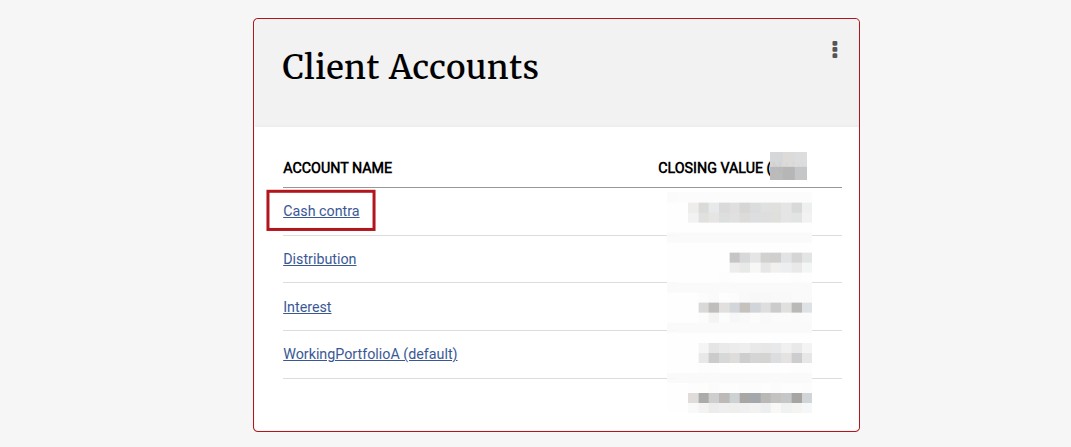
In this release the concept of a Cash Contra and Dealer Settlement client accounts were added, please see link for more details.
This functionality details a new cash accounting model designed to resolve synchronisation issues between bank account entries and client account balances.
There is a time difference between when bank entries are imported and when bank entries are matched. Cash Contra client accounts on working portfolios and Dealer Settlement client accounts on dealers ensure that cash assets and cash liabilities remain synchronised.
More changes include:
General (Includes Reports, Processes, Message Changes & Validation improvements)
- When a Contact Person logs in, the Company Type of the linked company will now reflect on the Contact Person Card. (55243)
- The ability to select the viewing priority (order) of contract owner names on a contract where there are multiple contract owners. See link (55259)
- Contracts classified as Administrative or Adviser will now only show instrument accounts with either positive or negative values on the Instrument accounts card, instrument accounts with zero value will not be shown. See link (52690)
- Instrument Accounts now have a date range which filters the visible transactions accordingly. By default it only shows transactions for the last year. You can change the from date to show additional transactions. (55656)
- The gross remuneration calculation on Income Tax Certificates and the SARS PAYE Recon File has been corrected to include annuity withdrawal transactions where 100% of the withdrawal value is withheld for PAYE, or where the payment was cancelled but the PAYE amount was still withheld. See link (55170)
- Optimized calculation of IRR values (55311)
- Ensured instructions submitted via an API user enforces Regulation 28 validation where applicable. See link (55137)
- Ability added to process weekly recurring withdrawals/investments (debit orders). See link(55225)
- Brokerage logo can appear on contribution certificates if the ‘use brokerage logo on tax certificates’ setting is enabled on the Brokerage, and a logo has been uploaded on the company entity associated with the Brokerage. See link (55246)
- Coupon dates displayed on a Policy Document are now displayed as ‘COUPON DATE 1, COUPON DATE 2, COUPON DATE 3’ etc. and not 1st COUPON DATE, 2nd COUPON DATE etc. as previously displayed (55242)
- Ensured payment transactions and bank account entries are in the same instrument account, as a once-off data fix. (55627)
- The font size used on graphs (graph titles and axis labels) on both the front-end application and in generated pdf documents, has been increased across the board, please review for suitability. (54515)
- Improved Finswitch instruction import validation to use the ‘Finswitch Reference Number’ to determine if instructions in the upload file are duplicates when all other values are the same (amount/units, Reference No, Accounts No etc.). If the ‘Finswitch Reference Number’ differs the instructions will not be regarded as a duplicate and both will be uploaded. See Validation B in link (54269)
- Validation message improved when attempting to generate a surrender letter from a withdrawal instruction where the template has not been set up on the product -> document templates. See link (55440)
- A dedicated Interest Client Account has been created for the Working Portfolio where the mirror transactions of interest transactions are written to. This will eliminate interest transactions reflecting in the Working Portfolio default account. Historical interest transactions will also be moved into this new account. See link (55200).
- The status of debit order instructions will automatically be changed to Cancelled when the debit order declines (applicable to Natwest and NamPay) (55275)
- Renamed ‘Natwest reversed debit orders’ report to ‘Unsuccessful debit order bank responses’ report and added additional columns to the report. The report will now be used for both the Natwest and Nampay debit order host to host collection process. See link (55275)
- Improved ‘Unsuccessful debit order bank responses’ report to display all combined debit order collections in the report (applicable to Natwest and NamPay). See link (55297)
- Improved the validation when processing a Fund Merger to alert the user when a Supplier Instrument Account needs to be created for the receiving instrument (52957). See link.
- Hide button’Upload Confirmation’ on Debit Order Collections screen and Payment Batches screen from client users, as it does not seem to be used by any client. The functionality will be deprecated in the next release. (55497)
- On a cash distribution or a cash instrument with a unit distribution, we added the ability to enforce matching before allocating the distribution, see link (55443)
- Added three columns to Import Advisors; Adviser Status (Active / Deactivated), Pay out adviser fee (Y/N), Pay out original amount (Y/N). See link (55181)
- Added the ability to reverse debit orders against a bank entry that is larger than the debit order amount (partial match). See link (55111)
- Added report ‘Possible unreconciled cash’ to Dealer settlement accounts and Cash Contra accounts (Instrument account->More Actions) to assist in identifying why there is a balance on the relevant account (only available to Finworks administrators) (55456)
- Created an ASISA Report for Statistical Industry Reporting (Fund Flows). A new field called Product Type is now visible on a Product’s configuration which needs to be selected in order to use this report. See link (55228)
- Added a product level configuration to enable the submitting and authorising of a client investment instruction before the deposit is matched. This will be switched off by default. See link (55207)
- Finworks Support Users’ existing “Zero Units” functionality has been changed to “Cancel and Hide”. When selected this will cancel (zero) and hide all the linked transactions (55470)
- On the Financial Needs Analysis added a default to “Include in cash flows” for both Once-off and Monthly items. See link (55539)
- Ensured all fee types available on the product is displayed in the quote document. See link (55276)
- Change to Financial Needs Analysis report headings for the Retirement Cash Flows Summary section to be in line with the Balance sheet, Income and Insurance items. (55569)
- Added an additional field “Instrument account number” to the Import Historical Transactions. See link (55493)
- New user permission ‘Download Bulk Overviews’ which allows ‘Download Bulk Overviews’ menu option on ‘New and Existing Members’ card to be displayed (Employer -> New and Existing Members card -> menu: Download Bulk Overviews). The default migration is off/disabled for this permission. See link (55375)
- Annual and lifetime limits on tax-free products enhanced to check across multiple tax-free investments. See link (55572)
- “Can Generate Quote” setting on a Product level will now determine if the ‘View Quote Document’ menu option is available on the Contract Details screen. See link (55578).
- Update to User landing page if a User is both a contact person and an Investor. See link (55250)
- Added functionality to make provision for issuer regulation 28 maximums. See link (55339)
- ‘Instruction’s Asset Allocation’ and ‘Expected Asset Allocations’ were previously displayed as sections on the Instruction screen, these are now visible on a separate screen which is accessible by clicking on the regulation-28 warning link on the instruction screen (55339)
- ‘Reconciliation for supplier instrument account’ screen has been enhanced with ‘Only show dates with discrepancies’ and ‘Exclude transactions with zero values’ checkboxes, and five filters including: ‘All problematic’, ‘All’, ‘Non problematic’, ‘Only mismatched’ and ‘Only unmatched/unreconciled’. The release script iterates over the supplier instrument accounts for all cash instruments and moves any transactions in the wrong supplier instrument accounts to the correct account. See link (55106)
- Added the ability to set the “Cash Instrument for Internal switch” on a Portfolio Instrument. See link (54312)
- Added the ability to Cancel Initial Fees on a completed instruction. See link (55404)
- Added the ability to Cancel an Investment under defined conditions. See link (55404)
- Added option to enforce Two-factor Authentication for all users in bulk, see link (55531)
- Updated the Joint Contract ownership reporting on the SARS Files (IT3B & IT3C) to include all contract owners on a contract’s account holder demographic data and financial data (55679)
- On the Automatic Email Fee Statements Job, we have added the ability to choose how the Commission statement file name will be displayed, with the option to show either the Brokerage Code or the Brokerage Name. See link (55376)
- Contra transactions (as per main item) for pre take-on historical transactions will be grouped in its own client account on the working portfolio called Pre Take On (55656). See link
- We now prevent scheduled jobs from starting just before our daily clean-ups start, and initiate them afterwards when the daily clean-ups are done (54502)
- General code improvements made in the SMS sending service, regression of the SMS service is advised if this is being used. (55500)
- Fixed an issue whereby batch sizes when processing large amounts of data, became exponentially bigger causing performance issues. Batch sizes will now remain consistently small. (55721)
- ‘Should export zero balances?’ checkbox has been added on the ‘Export Transaction Data Job’ (system -> jobs). The default value for this new setting is off/deselected. (54847)
Integration (Includes Finswitch, Amazon S3, Azure blob, API, Calestone, Exports)
Refer to Change Log for all changes included in this release in the API, and Application Program Interface (API) for comprehensive API documentation.
Refer to Export Transaction Data Job (Amazon S3 Bucket or Azure Blob Storage)for comprehensive documentation on our data extracts.
Changes made in this release:
- The structure of the S3 export remains the same however the content will now include ‘Cash Contra’ transactions.The first S3 export following the release will include historical Cash Contra entries and will require more time than usual to complete and will contain a lot more data, this is only relevant to the first export as we export deltas. If you foresee this being an issue please reach out to the support team so we can discuss options with you.
The Cash Contra enhancement is explained in the main item above, please refer to the applicable help file for more details, see link. - Added the functionality to automatically upload Debit Order Collection files to and download Debit Order Confirmation files from NamPay, see link (54799)
- Added a call to the Accounts API to show if an instrument composition/split is Regulation 28 compliant before submitting an instruction. (55362)
- Date format updated to YYYY-MM-DD in data returned via GET: Instruction details call (55600)
- Accounts Holdings API was duplicating accrued interest and withholding tax on all instrument accounts, this has been fixed to only reflect accrued interest and withholding tax on the relevant instrument account (55663,55744)
Refer to your online GitLab Project for a full list of changes and enhancements for the release, and refer to our GitLab help file if required here.
Bug Fixes
- Correction of values on instrument instruction buys (55293)
- Incorrect count of accounts when allocating a distribution has been fixed. (54437)
- Resolved issue whereby financial analysis not saving when navigating to the Cash flows without saving the Financial analysis first. (55568)
- Ensure the updating of a postal address via the API do not give an error regarding an invalid tax number and behave similar to updating a postal address from the user interface(54465)
- Corrected bug where pot validation did not convert amounts(55292)
- Corrected error on needs analysis summary card when no date of birth is entered(55286)
- If the required monthly income was not set up correctly, an error occurred under ‘Additional Details’ Menu on Personal details Cards.(55227)
- Error resolved when submitting withdrawals on a Cash Account (55331 & 55350)
- Removed tick symbol reflecting on gains/losses certificate (55336)
- Error resolved when importing prices (55300, 55355)
- Ensure API to creating switches and Import switches look at the display code and the fund code to identify the instruments in the switch (55157)
- Screen display error resolved on Banking> Match Deposits (55363)
- Error when Resubmitting a debit order with an escalation date resolved (55272)
- Bulk process, Certificates – Interest and Dividends failed on transactions zero’ed, updated to give error message (55374)
- Error resolved when viewing historical changes on Cash Instrument (55381)
- AEOI for SARS product selection drop down includes label ‘All’ and no longer includes blank menu option (55194)
- Validation improved on an Entity when making a User (55368)
- Error resolved where the Returns Card, to and from dates did not correspond to the heading “Since Inception” – this bug has been corrected(55345)
- Accrued Fees on screen percentage display error resolved (55364)
- Error resolved on S3 exports to exclude zero balance inactive cash instrument accounts (54847)
- Validation improved where a confirmed Deal Amount cannot be different to the matched bank entry (55335)
- We added a Welcome Letter Sent date and fixed a bug regarding the sent status’ (55291)
- Error when generating SARS DWT Submission File (55426)
- Notification Messages no longer displaying the where only the date should be displayed (55418)
- Error “No valid session. Try reloading” (55294)
- Resolved an error that occurred when selecting beneficiary relationship types (person or company) during a new investor’s online application (55432)
- Error resolved when removing instrument from employer group (55420)
- Increased number of allowed lines as well as debit and credit functionality in a Swift banking file and (55255)
- Added instrument code to Detailed Transactions Flow screen for instrument providers, and instrument name to Transactions Inflow and Outflow screens (previously removed) (55284)
- Assets Under Management graph updated to exclude market values of contracts owned by, but not under the Advice of, an Advisor (55153)
- Resolved Provisional Tax Certificates Error, of the opening balance not being correct, thus pulling a zero amount (55457)
- Error resolved when clicking on contract instruction group (55351)
- Error resolved when clicking into Instructions -> Submitted
- Resolved Capital Gains error of omitted activity on the start date due to closing-balance snapshot timing, which was resolved by shifting “startDate” back by one day (fromDate – 1 day) to accurately capture the opening account value (#55469)
- Error resolved on all statuses not pulling through on the Account Status Report (55496)
- Error resolved by removing deleted Withdrawals from instances. We have also added code to keep record of when and by whom anything was deleted, as well as a check that we do not add a deleted instance again(55503)
- When Initial fees taken Implicitly are cancelled, the once off investment will update to reflect no fee taken (55327)
- Disabled editing for the core Anonymous internal user account to prevent configuration errors and ensure stable background session tracking for signed-out users.(55505)
- Error resolved when importing JSE Contract note (55517).
- Error resolved when importing Finswitch pricing files (528891).
- Internal changes were made to the process on how we generate backups, e.g. additional validations (55265).
- Some pre-work was done for upgrading Gemstone (55173).
- Error resolved on selecting search on partial matched or unmatched bank entries. (55576)
- Resolved error when when trying to submit debit order (55598).
- Validation added for the working days on the AutomaticFeeRunJob. This field is compulsory and cannot be left blank. (55534)
- Performance issues resolved when attempting to remove model portfolios (55587)
- Error when uploading an Online Form resolved (55360)
- Error on button styling resolved when restoring Production to the Test/Training sites (55409)
- Technical error resolved on User Errors and emails showing daily job failures (55542)
- Error resolved on display while waiting for report request to load (55622)
- Error resolved when importing the Postal Address City (55298)
- Failed Invariant check on MatchedBankAccountEntries resolved (55606)
- Error resolved when accessing SARS file (55655, 55658)
- Error resolved on Automatic Fee Run Job (55629)
- Error resolved when submitting a Switch instruction where the status should be Set to Pending Authorisation (55561)
- Resolved the underlying validation error that was silently blocking instruction creation when a second authorisation rule was triggered during a bulk import. Instructions that exceed the authorisation threshold are now successfully created and immediately placed into the Instruction ? Pending Authorisation queue. (55644)
- Fixed a rounding error on a historical data fix (55555)
- Fixed Contract Details history that hid fee rate changes that repeat an earlier value (55753)
- Error resolved when processing fee run (55676)
- Issue resolved where imported first system fee date for an ongoing Advisor fee could not be subsequently changed via the user interface (55781)
- Ensured that ‘Proceed With Sells Ready to Recur Job’ displays all sells where there are not enough units available to proceed (54332)
- Fixed: Bulk import instructions that exceed the second authorisation threshold now correctly create and route to the Pending Authorisation queue, rather than failing to import entirely (55644)
- Fixed warning that could not be resolved where dividend or interest withholdings tax is true and no reason has been supplied at migration (55819)
Software update can include but is not limited to:
- Bug fixes.
- New and/or enhanced features.
- Further improvement to performance
Last Updated on 5 days ago by Hayley Jerram